• Download
  • Products
    • Product Highlights
      • DataHub Smart MQTT Broker
      • DataHub IoT Gateway
      • DataHub OPC Gateway
      • DataHub service for Azure
      • DataHub OPC Bridge
      • OPC DataHub
      • DataHub WebView
      • DataHub Modbus OPC Server
    • Tunnellers
      • DataHub UA Tunneller
      • DataHub DA Tunneller
      • DataHub Tunnel A&E
      • DataHub Modbus Tunneller
      • DataHub DDE Tunneller
      • Individual Features
        • Redundancy
        • Data Diode Mode
        • Monitoring
    • Historians
      • Connect to InfluxDB
      • Connect to Amazon Kinesis
      • Connect to AVEVA Historian
      • Connect to AVEVA Insight
      • Connect to AVEVA PI
      • Connect to RESTful Systems
      • Connect to Kafka
      • Connect to ODBC
      • Connect to Azure Event Hubs
      • Connect to OPC Classic HDA
    • Notifications
      • Alarm and Notification
      • Email / SMS
      • OPC A&E support
      • OPC UA A&C support
    • Excel and DDE
      • DataHub Add-In
        for Microsoft Excel
      • DDE / Excel
    • Loggers
      • DataHub OPC Logger
      • DataHub Modbus Logger
  • Purchasing
    • How to Purchase
    • Request a Quote
    • Feature Matrix
    • Software Subscription Plan
    • Maintenance Support Plan
    • Educational Program
  • Learning Hub
    • Industries & Use Cases
      • Wind & Solar
      • Conventional Energy
      • Oil & Gas
      • Minerals & Mining
      • Manufacturing
      • Food & Beverage
      • Pharma & Healthcare
      • System Integration
      • Machines & Tools
    • Knowledge Center
      • Videos
      • Webinars
      • How-To
      • Case Studies
      • White Papers
      • Essential Guides
        • MQTT & Sparkplug Essentials
        • DataHub Security Essentials
    • Connecting
      • Industrial AI
      • Industrial IoT
      • Secure OT to IT
      • OPC
      • Historian
      • MQTT
        • Sparkplug
      • Database
      • Modbus
      • Excel
      • Web
      • Embedded
      • Open APIs
      • DHTP
      • Architecture
  • Support
    • FAQ
    • Documentation
    • Release Notes
    • Technical Specifications
  • About
    • Partners
    • Customers
    • Testimonials
    • Privacy Policy
    • Terms of Use
    • Legal Notices
  • Click to open the search input field Click to open the search input field Search
  • Menu Menu
  • Download
  • Products
    • DataHub Smart MQTT Broker
    • DataHub IoT Gateway
    • DataHub OPC Gateway
    • DataHub service for Azure
    • DataHub OPC Bridge
    • OPC DataHub
    • DataHub WebView
    • DataHub Modbus OPC Server
    • Tunnellers
      • DataHub UA Tunneller
      • DataHub DA Tunneller
      • Tunnel A&E
      • DataHub Modbus Tunneller
      • DataHub DDE Tunneller
    • Historians
      • Connect to InfluxDB
      • Connect to Amazon Kinesis
      • Connect to AVEVA Historian
      • Connect to AVEVA Insight
      • Connect to AVEVA PI
      • Connect to RESTful Systems
      • Connect to Kafka
      • Connect to Azure Event Hubs
      • Connect to ODBC
      • Connect to OPC Classic HDA
    • Notifications
      • Alarm and Notification
      • Email / SMS
      • OPC A&E support
      • OPC UA A&C support
    • Excel and DDE
      • DataHub Add-in for Microsoft Excel
      • DDE / Excel
    • Loggers
      • DataHub OPC Logger
      • DataHub Modbus Logger
      • Monitoring
    • Individual Features
      • Redundancy
      • Data Diode Mode
      • Monitoring
  • Purchasing
    • How to Purchase
    • Request a Quote
    • Feature Matrix
    • Software Subscription Plan
    • Maintenance Support Plan
    • Educational Program
  • Learning Hub
    • Industries & Use Cases
      • Wind and Solar
      • Conventional Energy
      • Oil & Gas
      • Minerals & Mining
      • Manufacturing
      • Food and Beverage
      • Pharma and Healthcare
      • System Integration
      • Machines and Tools
    • Knowledge Center
      • Videos
      • Webinars
      • How-to
      • Case Studies
      • White Papers
    • Essential Guides
      • MQTT and Sparkplug Essentials
      • DataHub Security Essentials
    • Connecting
      • Industrial AI
      • Industrial IoT
      • Secure OT to IT
      • OPC
      • Historian
      • MQTT
        • Sparkplug
      • Database
      • Modbus
      • Excel
      • Web
      • Embedded
      • Open APIs
      • DHTP
      • Architecture
  • Support
    • FAQ
    • Documentation
    • Release Notes
    • Technical Specifications
  • About
    • Partners
    • Customers
    • Testimonials
    • Privacy Policy
    • Terms of Use
    • Legal Notices

Historian

A data recorder for rapid archiving and quick playback

If you need to record every value in a high-speed process, a relational database like SQL Server, MySQL or Oracle might not be up to the task. The Historian feature lets your Cogent DataHub™ software act like a flight recorder for process data, providing high speed storage and retrieval of data, capable of processing millions of transactions per second.
Try it now
Get a quote
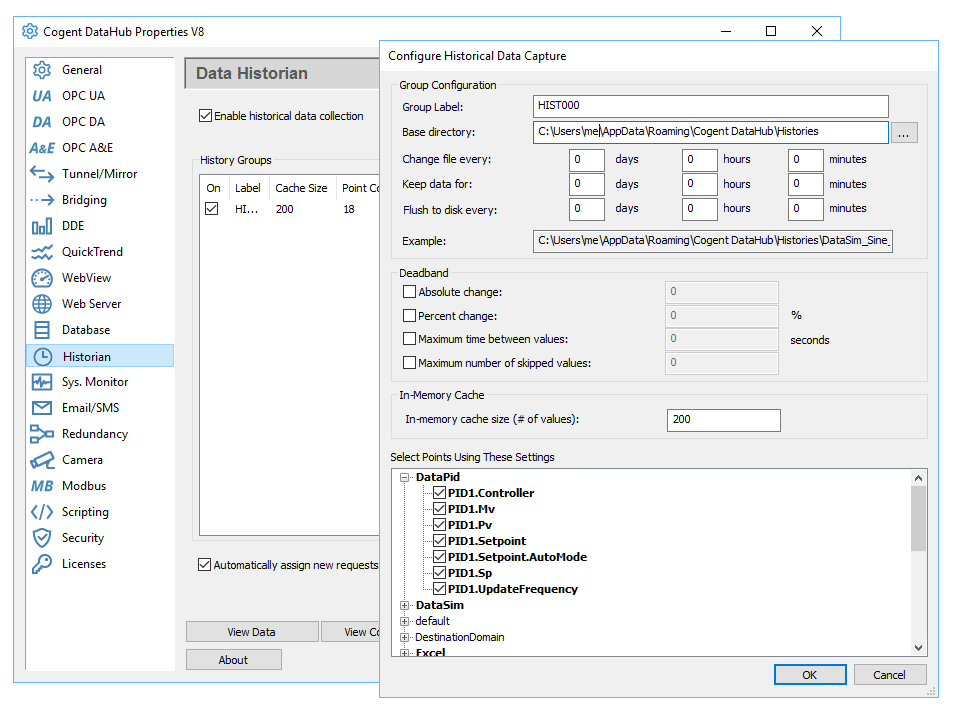
Historian screen capture

Historian features

The DataHub Historian feature is a high speed, low cost historical data storage mechanism that stores very little data per value change, so it has a very small on-disk footprint. The Historian comes with a disk space management feature that allows you to specify how much data to store for each point or how long to store the data and when to change the storage file names, all of which help to optimize storage on disk. The Historian can also be set up to automatically store data point histories when they are requested by a client program. For example, if you had a client that wanted to trend specific data, then the client program can tell the Historian to start storing data for those data points so they are available should the client program want to go back in time to display historical data. No pre-configuration of the Historian feature is required.

Technical summary

  • Records point name, value, quality and timestamp and makes them available for rapid access.
  • Utilizes in-memory caching, to store data in memory and periodically write data to disk. This allows for very high speed queries as some queries can be fully services by the memory cache, without having to read from the disk.
  • But even when reading from disk, the Historian feature is capable of reading more than 1 million values per second on standard computer hardware.
  • Highly efficient storage algorithms ensure no data gets dropped.
  • History files are created, stored, and accessed automatically.
  • In addition to straight queries of the raw data, the Historian also includes built-in query functions capable of producing analytical information which allows you to select any time period, from a few seconds to weeks, months, or longer, and retrieve averages, percentages of good and bad quality, time correlations, regressions, standard deviations, and more.
  • Access to the Historian is available through the DataHub QuickTrend and WebView applications as well as through the built-in Gamma scripting language.
  • Multiple deadbanding options lets you save space by eliminating repetitive or unnecessary values.

Technical questions

What is the size of the data stored on disk?

The calculation is 18 bytes on disk per stored value. Only boolean, integer and floating point types are supported. The DataHub Historian will not store strings.

The number of stored values in a given period will depend on the rate of change of the data. The DataHub Historian does not sample the data – it stores every change. If your data point changes only 4 times in a day, then a day of data will consume 72 bytes on disk. If your data point changes every 100ms then a day of data will consume 15.5 MB.

In the case of OPC DA data, the rate of change of data can be limited by modifying the minimum update rate of the OPC connection. This will allow you to compute a worst-case scenario. Timestamps on disk are recorded to the nearest nanosecond resolution.

Does the historian compress data?

The DataHub Historian does not compress data on disk. It stores only changed values, so there will be no consecutive duplicate values in the file.

If you configure deadbanding in the historian, you can reduce the number of values saved to disk. This is the best approach to limiting the number of values on disk without missing significant data changes.

In general, the DataHub historian uses data change events to ensure that all important data is captured, and uses deadbands to filter out insignificant events. That will produce either a perfect copy of the data stream (if no deadband is set) or a high-fidelity copy of the data stream removing only the “jitter” in the input. Some other historians sample the data periodically, causing the file on disk to be much larger, and also causing the historian to miss important events that occur between samples.

How can I access the data in the Historian?

There are a few ways to access the data in the Historian:

  1. Using DataHub QuickTrend,
  2. Using DataHub WebView trend controls,
  3. Using DataHub scripting (Gamma scripts),
  4. Using the DataHub OPC UA Historical Access interface,
  5. Or, you can read the history files directly. The data file format is very simple. Anybody could write a tool to read these files.

Can I access the historical data from a web page?

Yes, as mentioned above, you can access the historical data in WebView screens using the trend control. Also, since the historical data is available in Gamma, it is very simple to write an ASP page using the DataHub web server that implements a web services historical query. Any HTML page could contain historical data, and XmlHttpRequest calls from Javascript could read historical data as well.

The Historian feature is included in any WebView license pack or add-on license, and can also be added to any other license pack.

Product Code Features
Data Historian ADDHIS Historian
  • Data Protocols
    • OPC UA
    • OPC DA
    • OPC A&E
    • MQTT Client
    • ODBC
    • Modbus Driver
    • DDE / Excel
  • Integration
    • Aggregation
    • Tunnel / Mirror
    • MQTT Broker
    • Database Write
    • Database Read
    • Bridging
    • Redundancy
  • Data Isolation
  • Visualization
    • WebView
    • Camera
    • QuickTrend
  • Remote Access
    • Remote Config
    • Embedded Devices
  • Customize
    • DataHub APIs
    • Scripting
  • Utilities
    • Event Streams
    • External Historian
    • InfluxDB
    • Notification
    • Email / SMS
    • Security
    • Web Server
    • System Monitor
    • Historian
Cogent DataHub footer logo white
  • Download
  • Products
  • Purchasing
  • Learning Hub
  • Support
  • About
  • Back to Top
  • LinkedIn iconTwitter iconYouTube icon

Skkynet
302-2233 Argentia Road
Mississauga, ON L5N 2X7

International: 1-905-702-7851
US toll free: 1-888-702-7851

[email protected]
[email protected]
[email protected]
[email protected]

© 2026 Skkynet | All rights reserved | Legal notices
Scroll to top Scroll to top Scroll to top

We are using cookies to give you the best experience on our website.

You can find out more about which cookies we are using or switch them off in .

Cogent DataHub Logo
Powered by  GDPR Cookie Compliance
Privacy Overview

This website uses cookies so that we can provide you with the best user experience possible. Cookie information is stored in your browser and performs functions such as recognising you when you return to our website and helping our team to understand which sections of the website you find most interesting and useful.

Strictly Necessary Cookies

Strictly Necessary Cookie should be enabled at all times so that we can save your preferences for cookie settings.

3rd Party Cookies

This website uses Google Analytics to collect anonymous information such as the number of visitors to the site, and the most popular pages.

Keeping this cookie enabled helps us to improve our website.

Cookie Policy

More information about our Cookie Policy