• Download
  • Products
    • Product Highlights
      • DataHub Smart MQTT Broker
      • DataHub IoT Gateway
      • DataHub OPC Gateway
      • DataHub service for Azure
      • DataHub OPC Bridge
      • OPC DataHub
      • DataHub WebView
      • DataHub Modbus OPC Server
    • Tunnellers
      • DataHub UA Tunneller
      • DataHub DA Tunneller
      • DataHub Tunnel A&E
      • DataHub Modbus Tunneller
      • DataHub DDE Tunneller
      • Individual Features
        • Redundancy
        • Data Diode Mode
        • Audit
        • Monitoring
    • Historians
      • Connect to InfluxDB
      • Connect to Amazon Kinesis
      • Connect to AVEVA CONNECT
      • Connect to AVEVA Historian
      • Connect to AVEVA Insight
      • Connect to AVEVA PI
      • Connect to RESTful Systems
      • Connect to Kafka
      • Connect to ODBC
      • Connect to Azure Event Hubs
      • Connect to OPC Classic HDA
    • Notifications
      • Alarm and Notification
      • Email / SMS
      • OPC A&E support
      • OPC UA A&C support
    • Excel and DDE
      • DataHub Add-In
        for Microsoft Excel
      • DDE / Excel
    • Loggers
      • DataHub OPC Logger
      • DataHub Modbus Logger
  • Purchasing
    • How to Purchase
    • Request a Quote
    • Feature Matrix
    • Software Subscription Plan
    • Maintenance Support Plan
    • Educational Program
  • Learning Hub
    • Industries & Use Cases
      • Wind & Solar
      • Conventional Energy
      • Oil & Gas
      • Minerals & Mining
      • Manufacturing
      • Food & Beverage
      • Pharma & Healthcare
      • System Integration
      • Machines & Tools
    • Knowledge Center
      • Videos
      • Webinars
      • How-To
      • Case Studies
      • White Papers
      • Essential Guides
        • MQTT & Sparkplug Essentials
        • DataHub Security Essentials
    • Connecting
      • Industrial AI
      • Industrial IoT
      • Secure OT to IT
      • OPC
      • Historian
      • MQTT
        • Sparkplug
      • Database
      • Modbus
      • Excel
      • Web
      • Embedded
      • Open APIs
      • DHTP
      • Architecture
  • Support
    • FAQ
    • Documentation
    • Release Notes
    • Technical Specifications
  • About
    • Partners
    • Customers
    • Testimonials
    • Legal Notices
  • Click to open the search input field Click to open the search input field Search
  • Menu Menu
  • Download
  • Products
    • DataHub Smart MQTT Broker
    • DataHub IoT Gateway
    • DataHub OPC Gateway
    • DataHub service for Azure
    • DataHub OPC Bridge
    • OPC DataHub
    • DataHub WebView
    • DataHub Modbus OPC Server
    • Tunnellers
      • DataHub UA Tunneller
      • DataHub DA Tunneller
      • Tunnel A&E
      • DataHub Modbus Tunneller
      • DataHub DDE Tunneller
    • Historians
      • Connect to InfluxDB
      • Connect to Amazon Kinesis
      • Connect to AVEVA Historian
      • Connect to AVEVA Insight
      • Connect to AVEVA PI
      • Connect to RESTful Systems
      • Connect to Kafka
      • Connect to Azure Event Hubs
      • Connect to ODBC
      • Connect to OPC Classic HDA
    • Notifications
      • Alarm and Notification
      • Email / SMS
      • OPC A&E support
      • OPC UA A&C support
    • Excel and DDE
      • DataHub Add-in for Microsoft Excel
      • DDE / Excel
    • Loggers
      • DataHub OPC Logger
      • DataHub Modbus Logger
      • Monitoring
    • Individual Features
      • Redundancy
      • Data Diode Mode
      • Monitoring
  • Purchasing
    • How to Purchase
    • Request a Quote
    • Feature Matrix
    • Software Subscription Plan
    • Maintenance Support Plan
    • Educational Program
  • Learning Hub
    • Industries & Use Cases
      • Wind and Solar
      • Conventional Energy
      • Oil & Gas
      • Minerals & Mining
      • Manufacturing
      • Food and Beverage
      • Pharma and Healthcare
      • System Integration
      • Machines and Tools
    • Knowledge Center
      • Videos
      • Webinars
      • How-to
      • Case Studies
      • White Papers
    • Essential Guides
      • MQTT and Sparkplug Essentials
      • DataHub Security Essentials
    • Connecting
      • Industrial AI
      • Industrial IoT
      • Secure OT to IT
      • OPC
      • Historian
      • MQTT
        • Sparkplug
      • Database
      • Modbus
      • Excel
      • Web
      • Embedded
      • Open APIs
      • DHTP
      • Architecture
  • Support
    • FAQ
    • Documentation
    • Release Notes
    • Technical Specifications
  • About
    • Partners
    • Customers
    • Testimonials
    • Privacy Policy
    • Terms of Use
    • Legal Notices

Remote Config

Convenient configuration options

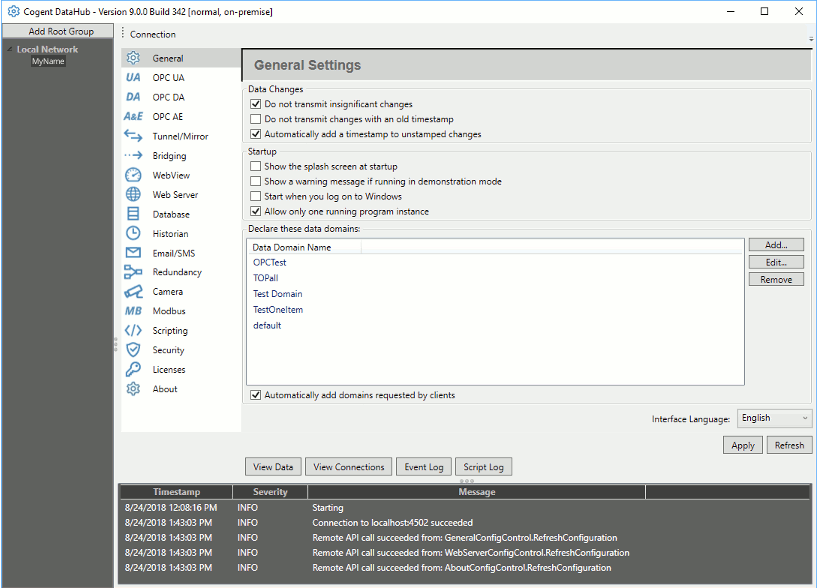
Starting with Version 9, you can configure the Cogent DataHub™ software remotely or while it is running as a service using the Remote Config feature, which is included with all Version 9 licenses.
Try it now
Get a quote

Remote Configuration screen capture
Why Use Remote Config?
  • Manage a network of DataHub installations from one location.
  • Configure the DataHub while it is running as a service.
  • Access to configuration changes can be controlled:
    • User control (user name, password)
    • Each feature can be allowed independently
    • Configure locally, remotely, or both
  •  Comes standard in all Version 9 license packs.
Requirements
  • DataHub Version 9 or higher.
  • An open inbound firewall port to connect.
  • DataHub Web Server must be enabled. (Note: Each DataHub v9 license pack enables DataHub Web Server support for a Remote Config connection.)

Remote Config is part of the DataHub Core, and is thus available in all Products.

  • Data Protocols
    • OPC UA
    • OPC DA
    • OPC A&E
    • MQTT Client
    • ODBC
    • Modbus Driver
    • DDE / Excel
  • Integration
    • Aggregation
    • Tunnel / Mirror
    • MQTT Broker
    • Database Write
    • Database Read
    • Audit
    • Bridging
    • Redundancy
  • Data Isolation
  • Visualization
    • WebView
    • Camera
    • QuickTrend
  • Remote Access
    • Remote Config
    • Embedded Devices
  • Customize
    • DataHub APIs
    • Scripting
  • Utilities
    • Event Streams
    • External Historian
    • InfluxDB
    • Notification
    • Email / SMS
    • Security
    • Web Server
    • System Monitor
    • Historian
Cogent DataHub footer logo white
  • Download
  • Products
  • Purchasing
  • Learning Hub
  • Support
  • About
  • Back to Top

Skkynet
302-2233 Argentia Road
Mississauga, ON L5N 2X7

International: 1-905-702-7851
US toll free: 1-888-702-7851

support@skkynet.com
sales@skkynet.com
marketing@skkynet.com
info@skkynet.com

Follow us
on social media!

© 2026 Skkynet | All rights reserved | Legal notices
Scroll to top Scroll to top Scroll to top
GDPR Cookie Banner

We are using cookies to give you the best experience on our website.

You can find out more about which cookies we are using or switch them off in .