• Download
  • Products
    • Product Highlights
      • DataHub Smart MQTT Broker
      • DataHub IoT Gateway
      • DataHub OPC Gateway
      • DataHub service for Azure
      • DataHub OPC Bridge
      • OPC DataHub
      • DataHub WebView
      • DataHub Modbus OPC Server
    • Tunnellers
      • DataHub UA Tunneller
      • DataHub DA Tunneller
      • DataHub Tunnel A&E
      • DataHub Modbus Tunneller
      • DataHub DDE Tunneller
      • Individual Features
        • Redundancy
        • Data Diode Mode
        • Monitoring
    • Historians
      • Connect to InfluxDB
      • Connect to Amazon Kinesis
      • Connect to AVEVA Historian
      • Connect to AVEVA Insight
      • Connect to AVEVA PI
      • Connect to RESTful Systems
      • Connect to Kafka
      • Connect to ODBC
      • Connect to Azure Event Hubs
      • Connect to OPC Classic HDA
    • Notifications
      • Alarm and Notification
      • Email / SMS
      • OPC A&E support
      • OPC UA A&C support
    • Excel and DDE
      • DataHub Add-In
        for Microsoft Excel
      • DDE / Excel
    • Loggers
      • DataHub OPC Logger
      • DataHub Modbus Logger
  • Purchasing
    • How to Purchase
    • Request a Quote
    • Feature Matrix
    • Software Subscription Plan
    • Maintenance Support Plan
    • Educational Program
  • Learning Hub
    • Industries & Use Cases
      • Wind & Solar
      • Conventional Energy
      • Oil & Gas
      • Minerals & Mining
      • Manufacturing
      • Food & Beverage
      • Pharma & Healthcare
      • System Integration
      • Machines & Tools
    • Knowledge Center
      • Videos
      • Webinars
      • How-To
      • Case Studies
      • White Papers
      • Essential Guides
        • MQTT & Sparkplug Essentials
        • DataHub Security Essentials
    • Connecting
      • Industrial AI
      • Industrial IoT
      • Secure OT to IT
      • OPC
      • Historian
      • MQTT
        • Sparkplug
      • Database
      • Modbus
      • Excel
      • Web
      • Embedded
      • Open APIs
      • DHTP
      • Architecture
  • Support
    • FAQ
    • Documentation
    • Release Notes
    • Technical Specifications
  • About
    • Partners
    • Customers
    • Testimonials
    • Privacy Policy
    • Terms of Use
    • Legal Notices
  • Click to open the search input field Click to open the search input field Search
  • Menu Menu
  • Download
  • Products
    • DataHub Smart MQTT Broker
    • DataHub IoT Gateway
    • DataHub OPC Gateway
    • DataHub service for Azure
    • DataHub OPC Bridge
    • OPC DataHub
    • DataHub WebView
    • DataHub Modbus OPC Server
    • Tunnellers
      • DataHub UA Tunneller
      • DataHub DA Tunneller
      • Tunnel A&E
      • DataHub Modbus Tunneller
      • DataHub DDE Tunneller
    • Historians
      • Connect to InfluxDB
      • Connect to Amazon Kinesis
      • Connect to AVEVA Historian
      • Connect to AVEVA Insight
      • Connect to AVEVA PI
      • Connect to RESTful Systems
      • Connect to Kafka
      • Connect to Azure Event Hubs
      • Connect to ODBC
      • Connect to OPC Classic HDA
    • Notifications
      • Alarm and Notification
      • Email / SMS
      • OPC A&E support
      • OPC UA A&C support
    • Excel and DDE
      • DataHub Add-in for Microsoft Excel
      • DDE / Excel
    • Loggers
      • DataHub OPC Logger
      • DataHub Modbus Logger
      • Monitoring
    • Individual Features
      • Redundancy
      • Data Diode Mode
      • Monitoring
  • Purchasing
    • How to Purchase
    • Request a Quote
    • Feature Matrix
    • Software Subscription Plan
    • Maintenance Support Plan
    • Educational Program
  • Learning Hub
    • Industries & Use Cases
      • Wind and Solar
      • Conventional Energy
      • Oil & Gas
      • Minerals & Mining
      • Manufacturing
      • Food and Beverage
      • Pharma and Healthcare
      • System Integration
      • Machines and Tools
    • Knowledge Center
      • Videos
      • Webinars
      • How-to
      • Case Studies
      • White Papers
    • Essential Guides
      • MQTT and Sparkplug Essentials
      • DataHub Security Essentials
    • Connecting
      • Industrial AI
      • Industrial IoT
      • Secure OT to IT
      • OPC
      • Historian
      • MQTT
        • Sparkplug
      • Database
      • Modbus
      • Excel
      • Web
      • Embedded
      • Open APIs
      • DHTP
      • Architecture
  • Support
    • FAQ
    • Documentation
    • Release Notes
    • Technical Specifications
  • About
    • Partners
    • Customers
    • Testimonials
    • Privacy Policy
    • Terms of Use
    • Legal Notices

Cogent DataHub™

Real-Time Software for Industrial Automation

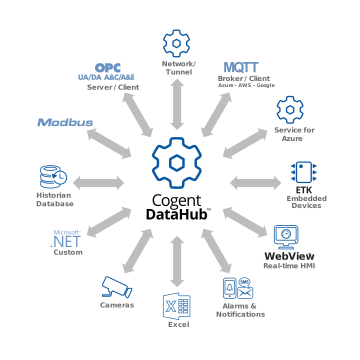
Use Cogent DataHub software to make real-time, bidirectional connections to OPC UA, DA, MQTT, A&C, and A&E clients and servers. Connect any SQL database, Modbus slave, Excel spreadsheet, custom programs, embedded systems, Microsoft Azure IoT Hub, AWS IoT Core, AWS Kinesis, any standard MQTT client or broker, and popular real-time data historians.
Try it Now Request a Quote
Cogent DataHub products wheel diagram

Integrate all data into a single, unified set (unified namespace)

Bring all the data from all sources and any protocol, into a single, unified data set (also known as unified namespace) within the Cogent DataHub program. Any selected subset of this aggregated data can be accessed by any client using any supported protocol: OPC UA, OPC Classic, Modbus, MQTT, DDE, TCP, ODBC, HTTP, XML, and more.

Use your data in any number of ways

  • Network OPC servers and clients
  • Do monitoring and supervisory control
  • Log your data to real-time data historians or any SQL databases
  • Connect securely to the Industrial IoT
  • Generate alarms and notifications based on data changes
  • Run real-time analysis in Excel

What’s new in DataHub version 11
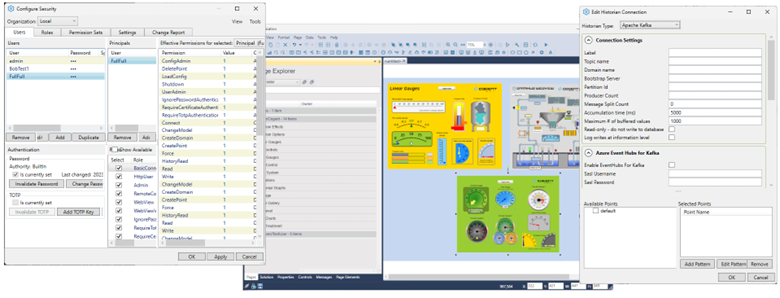
DataHub V11

Improved Security

An entirely new security model offers:

  • Import user accounts from a local Windows machine or external LDAP server
  • MFA – Authenticate users using multi-factor authentication, including TOTP (time-based one-time passwords).
  • Differentiate user access permissions by connection source (i.e., IP address, CIDR) and connection protocol (e.g., OPCUA, MQTT, TCP).
  • Create custom roles and permission sets for application functionality and to better secure data using domain-specific permissions.
  • More robust permission granularity for authorizing users.

The new security model uses a new file and format, and it automatically migrates the v10 security data (e.g., users and permissions). It’s also easy to revert back to v10 (see the documentation).

WebView Enhancements

DataHub WebView has a number of exciting new features and capabilities, including:

  • Multiple page tabs It is now possible to open multiple pages in Editing mode, and to quickly switch from one to another. An improved page handling algorithm supports quick switching between pages in Run mode.
  • Page Viewer control A new Page Viewer control lets you put multiple pages on a single page. This is handy for creating dashboard displays and slide shows.
  • Control access and editing Controls can now be searched, selected, and edited in bulk.
  • Lines and arrows There is a new line segment control for drawing lines and arrows on the page.
  • New script editor A new script editor provides a more intuitive coding environment with syntax highlighting and search/replace.

More Historian Connections

In version 11, the DataHub External Historian feature connects to:

  • Apache Kafka
  • Azure Event Hubs
  • OPC Classic HDA

Support for ODBC to allow connecting to virtually any SQL database is currently in development, and will be made available soon. Also coming soon, store-and-forward will be able to use data sources other than InfluxDB.

Better OPC DA Client Connections

The DataHub OPC DA server in version 11 can provide OPC items to clients without the DataHub-assigned domainname: prefix.

MQTT Enhancements

Both MQTT server and client features include support for Sparkplug 3 and MQTT V5 in version 11.

Cogent DataHub service for Azure

Support for DataHub version 11 running in Azure now includes Git versioning of configuration changes, along with the abilities to edit Azure firewall rules and add custom DNS names.

Data Diode Mode

Data diode mode available in version 11 configures DataHub tunnels to immediately discard all incoming data with zero processing. This mode also allows tunnels to pass through any hardware data diode that supports TCP emulation.

Data connectivity, integration, and visualization features

  • OPC DA or OPC UA Support – connect to OPC DA or UA servers and clients.
  • OPC A&E – Connect to OPC A&E servers and clients.
  • MQTT – Connect to MQTT clients and brokers
  • Tunnel/mirror – Secure networking of OPC data without DCOM problems.
  • WebView – Build and display private cloud-based web pages.
  • Database write – Write data to any ODBC database.
  • Database read – Read data from any ODBC database.
  • Data bridging – Connect two or more data sources to share data in real time.
  • External Historian – Store time-series data in popular historians.
  • Notification – Generate alarms and send notifications.
  • Modbus – Connect to Modbus TCP or RTU slave devices.
  • Data aggregation – Merge data from multiple sources into a common data set.
  • Secure Remote Configuration Tool – Configure a network of DataHub instances from a single location.
  • QuickTrend – View live, real-time trends for selected data.
  • Scripting – Program custom solutions to meet your specific needs.
  • Security – Control access and set permissions for users and groups.

Other features include DDE/Excel support for connecting to Excel spreadsheets and other DDE servers, Email/SMS notification to receive an email or SMS message based on data changes, internal Historian to store and retrieve large volumes of data at high speeds, data Redundancy to do hot standby switching between identical data sources, and Camera to stream live video or images of your system.

  • Cogent DataHub
  • DataHub Version 11
  • DataHub Smart MQTT Broker
  • DataHub IoT Gateway
  • DataHub OPC Gateway
  • Microsoft Azure
  • Tunnellers
    • DataHub UA Tunneller
    • DataHub DA Tunneller
    • Tunnel A&E
    • DataHub Modbus Tunneller
    • DataHub DDE Tunneller
  • Loggers
    • DataHub OPC Logger
    • DataHub Modbus Logger
  • Historians
    • Connect to InfluxDB
    • Connect to Amazon Kinesis
    • Connect to AVEVA Historian
    • Connect to AVEVA Insight
    • Connect to AVEVA PI
    • Connect to RESTful Systems
    • Connect to Kafka
    • Connect to ODBC
    • Connect to Azure Event Hubs
    • Connect to OPC Classic HDA
  • DataHub OPC Bridge
  • DataHub WebView
  • Notifications
    • Alarm and Notification
    • OPC A&E support
    • OPC UA A&C support
  • OPC DataHub
  • DataHub Modbus OPC Server
  • DataHub System Monitor
  • DataHub Add-in for Microsoft Excel
Cogent DataHub footer logo white
  • Download
  • Products
  • Purchasing
  • Learning Hub
  • Support
  • About
  • Back to Top
  • LinkedIn iconTwitter iconYouTube icon

Skkynet
302-2233 Argentia Road
Mississauga, ON L5N 2X7

International: 1-905-702-7851
US toll free: 1-888-702-7851

[email protected]
[email protected]
[email protected]
[email protected]

© 2026 Skkynet | All rights reserved | Legal notices
Scroll to top Scroll to top Scroll to top

We are using cookies to give you the best experience on our website.

You can find out more about which cookies we are using or switch them off in .

Cogent DataHub Logo
Powered by  GDPR Cookie Compliance
Privacy Overview

This website uses cookies so that we can provide you with the best user experience possible. Cookie information is stored in your browser and performs functions such as recognising you when you return to our website and helping our team to understand which sections of the website you find most interesting and useful.

Strictly Necessary Cookies

Strictly Necessary Cookie should be enabled at all times so that we can save your preferences for cookie settings.

3rd Party Cookies

This website uses Google Analytics to collect anonymous information such as the number of visitors to the site, and the most popular pages.

Keeping this cookie enabled helps us to improve our website.

Cookie Policy

More information about our Cookie Policy