MQTT and Sparkplug Essentials:
A complete guide for MQTT industrial data connectivity
This guide explains how MQTT and Sparkplug enable secure, scalable, and efficient industrial edge connectivity from fundamental concepts and best practices to real-world implementations powered by Cogent DataHub software and DataHub Smart MQTT Broker.
MQTT is a lightweight, TCP/IP-based publish–subscribe protocol for efficient, reliable device messaging in constrained or real-time environments. It minimizes network load, scales to thousands of clients, and is commonly used in Industrial IoT.
MQTT makes a good edge protocol for Industrial IoT because
MQTT fits best in the Industrial IoT at the edge. It is a simple, efficient messaging protocol designed to connect remote devices and applications to a central location, and it performs well at that task.
Sparkplug builds on MQTT by adding a standardized payload format and state-management model, so field devices, gateways, and applications can share structured, interoperable industrial data.
By design, MQTT is just a transport layer. It specifies how messages are delivered, not what is inside. Sparkplug adds structure and context. It provides a common data language for all devices, making it easier for them to communicate with each other.
The most benefit from Sparkplug comes when all connected devices are Sparkplug-enabled. If you are using an existing system, you may not have a choice—your devices and apps may all be one or the other. A good way to integrate data from regular MQTT and Sparkplug devices is with the DataHub Smart MQTT Broker.
| Pros | Cons |
|---|---|
| A good edge protocol for Industrial IoT. | Not a good backbone protocol for Industrial IoT. |
| Designed to be lightweight and efficient. | Lightweight design cannot support distributed state management. |
| QoS (Quality of Service) good for single-hop networking. | QoS (Quality of Service) not designed for multiple-hop networking. |
| Scales well, allowing thousands of device connections. | The broker is not aware of message content. |
| Pub/Sub architecture is efficient. | Message queues are not managed for each data point and client. |
| Last Will and Testament (LWT) for graceful client shutdowns. | Event order is not preserved. |
| Supports TLS for secure networking. | Clients are not notified when values are no longer current. |
When IIoT was introduced companies turned to familiar protocols like MQTT, REST and OPC UA for an IIoT protocol. Valid as these may be for their designed purposes, they were never intended to support Industrial IoT data communication. Thus, when evaluated according to criteria for a robust, secure IIoT implementation, they all come up somewhat short.

Skkynet’s software and services are designed for the IIoT, and our DHTP protocol meets the criteria for effective IIoT data communication.
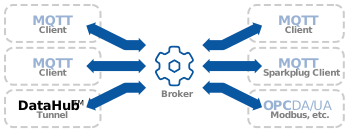
You can leverage MQTT by integrating it into a unified namespace with other protocols like OPC UA, DA, and A&E, as well as Modbus, ODBC, and others. The DataHub Smart MQTT Broker and MQTT Client features connect seamlessly with such a unified namespace, or allow you to create one, for full integration between legacy systems, custom programs, modern IoT platforms, cloud, and AI.
An MQTT client is a device or application that exchanges messages through a publish/subscribe mechanism with other MQTT clients via an MQTT broker. Many IIoT cloud services like Azure, Google, and AWS accept MQTT client connections.
Typically an MQTT gateway is used to connect OT systems to cloud services for data analysis and AI. Since industrial systems favor OPC for in-plant applications, an OPC-to-MQTT gateway is a popular way to move production data to the cloud. The DataHub IoT Gateway offers this kind of connectivity.
An MQTT broker is a server that provides a way for MQTT client devices and applications to exchange messages. The broker receives messages, manages client subscriptions, and redistributes them accordingly. MQTT brokers can be run on-premise, and are often used by IIoT cloud services like Azure, Google, and AWS. The DataHub MQTT Broker feature offers more than a normal MQTT broker. It is a smart MQTT broker.
By design, MQTT is simply a transport protocol. A regular MQTT broker has no knowledge of the content of its messages, nor the status of sender and receiver. But a smart MQTT broker can parse the messages and handle them intelligently. To provide these capabilities, Skkynet pioneered the DataHub Smart MQTT Broker, which can:
Here is a complete explanation of MQTT brokers—what you need to know to choose the best MQTT broker for your needs.
DataHub support for MQTT is fully integrated with the DataHub security model. This means multi-factor authentication (MFA), including time-based one-time passwords (TOTP).
User access permissions can be configured by connection source (i.e., IP address, CIDR) protocol (e.g., OPC UA, MQTT, TCP) and DataHub domain (data set).
Using DataHub tunnelling, you can also connect MQTT through a DMZ and even send MQTT data through a data diode to a cloud broker.
How does it all work under the hood? DataHub software makes the easy things easy and the difficult things possible. Configuring an MQTT connection is a matter of point-and-click, while integrating multiple JSON formats is straightforward using the Advanced Parser. Here are some links to get started.
The largest oil producer in the Caribbean used Cogent DataHub Smart MQTT Broker to integrate remote sensor data with AVEVA™ InTouch, Historian and Web client with redundancy switchovers.
A wood processing plant used DataHub software for data integration, cutting costs and improving cyber resilience—all without new hardware.
You can use a data integration tool like Cogent DataHub to convert OPC UA or Modbus data into MQTT messages, enabling seamless real-time communication with brokers, cloud services, or analytics systems.
Read more about multiple protocol connectivity.
Yes—when configured with TLS encryption, authentication, and access control, MQTT provides the reliability and security required for industrial operations and critical data transmission.
Read more on Cogent DataHub Security
Yes, MQTT efficiently transmits data from edge devices to central locations, and it may be used in cloud platforms as well. However, for any application that does not connect edge devices directly to the cloud, MQTT is not recommended. MQTT performs best over single-hop connections., enabling scalable Industrial IoT architectures that integrate real-time monitoring and advanced analytics.
The DataHub Smart MQTT broker can aggregate, standardize, and securely transmit MQTT data, offering quick, automatic parsing based on IETF JSON schemas, and support for multiple simultaneous JSON formats, as well as MQTT Sparkplug. In addition, built-in DataHub technology offers options for integrating other protocols—OPC DA, OPC UA, Modbus, ODBC, DDE—with any MQTT client.
Read more about the DataHub Smart MQTT Broker.
It may not be easy to switch to Sparkplug if you have a large MQTT deployment. But at any time, to add Sparkplug components into an existing MQTT system, you can use the DataHub Smart MQTT Broker. This will provide more consistent data formatting, basic device state tracking, and simplified scalability across mixed-vendor or large industrial deployments.
MQTT (Message Queuing Telemetry Transport)
A lightweight messaging protocol that uses a publish/subscribe model for efficient, reliable data exchange between devices and applications in IoT and industrial systems.
MQTT Broker
The central server that receives messages from publishers and routes them to subscribers based on topic filters, managing all MQTT traffic.
MQTT Client
Any device, application, or gateway that connects to an MQTT broker to send (publish) or receive (subscribe to) messages.
Publish/Subscribe Model
A communication pattern where devices publish messages to specific topics and subscribers receive only the topics they’re interested in—reducing network load and complexity.
Sparkplug
An MQTT specification that adds standardized payloads, topic naming, and device state management, making it easier for connected applications to communicate., enabling plug-and-play interoperability in Industrial IoT systems.
OPC UA (Open Platform Communications Unified Architecture)
A modern industrial protocol that standardizes secure and reliable data exchange between industrial equipment and software systems.
Modbus
A widely used industrial communication protocol for transmitting data between controllers, sensors, and devices in automation systems.
Protocol Conversion
The process of translating data between different communication protocols (e.g., OPC, Modbus, MQTT) to enable interoperability between diverse hardware and software components. across legacy and modern systems.
TLS (Transport Layer Security)
A cryptographic protocol that encrypts MQTT data in transit over TCP to ensure secure communication between clients and brokers.
Quality of Service (QoS)
An MQTT setting that defines sets message delivery guarantees parameters, ranging from at-most-once (QoS 0) to exactly-once (QoS 2) reliability.
Edge Device
A hardware or software system located near the data source (such as sensors or PLCs) that processes and transmits data, often via MQTT, to centralized or cloud systems.
IIoT (Industrial Internet of Things)
The use of connected sensors, machines, and analytics in industrial environments to optimize performance, reliability, and efficiency.
Historian
A database that collects, stores, and retrieves time-series industrial process data for reporting, analytics, and optimization.
Topic
The named channel under which MQTT messages are published and subscribed.


International: 1-905-702-7851
US toll free: 1-888-702-7851