• Download
  • Products
    • Product Highlights
      • DataHub Smart MQTT Broker
      • DataHub IoT Gateway
      • DataHub OPC Gateway
      • DataHub service for Azure
      • DataHub OPC Bridge
      • OPC DataHub
      • DataHub WebView
      • DataHub Modbus OPC Server
    • Tunnellers
      • DataHub UA Tunneller
      • DataHub DA Tunneller
      • DataHub Tunnel A&E
      • DataHub Modbus Tunneller
      • DataHub DDE Tunneller
      • Individual Features
        • Redundancy
        • Data Diode Mode
        • Monitoring
    • Historians
      • Connect to InfluxDB
      • Connect to Amazon Kinesis
      • Connect to AVEVA Historian
      • Connect to AVEVA Insight
      • Connect to AVEVA PI
      • Connect to RESTful Systems
      • Connect to Kafka
      • Connect to ODBC
      • Connect to Azure Event Hubs
      • Connect to OPC Classic HDA
    • Notifications
      • Alarm and Notification
      • Email / SMS
      • OPC A&E support
      • OPC UA A&C support
    • Excel and DDE
      • DataHub Add-In
        for Microsoft Excel
      • DDE / Excel
    • Loggers
      • DataHub OPC Logger
      • DataHub Modbus Logger
  • Purchasing
    • How to Purchase
    • Request a Quote
    • Feature Matrix
    • Software Subscription Plan
    • Maintenance Support Plan
    • Educational Program
  • Learning Hub
    • Industries & Use Cases
      • Wind & Solar
      • Conventional Energy
      • Oil & Gas
      • Minerals & Mining
      • Manufacturing
      • Food & Beverage
      • Pharma & Healthcare
      • System Integration
      • Machines & Tools
    • Knowledge Center
      • Videos
      • Webinars
      • How-To
      • Case Studies
      • White Papers
      • Essential Guides
        • MQTT & Sparkplug Essentials
        • DataHub Security Essentials
    • Connecting
      • Industrial AI
      • Industrial IoT
      • Secure OT to IT
      • OPC
      • Historian
      • MQTT
        • Sparkplug
      • Database
      • Modbus
      • Excel
      • Web
      • Embedded
      • Open APIs
      • DHTP
      • Architecture
  • Support
    • FAQ
    • Documentation
    • Release Notes
    • Technical Specifications
  • About
    • Partners
    • Customers
    • Testimonials
    • Privacy Policy
    • Terms of Use
    • Legal Notices
  • Click to open the search input field Click to open the search input field Search
  • Menu Menu
  • Download
  • Products
    • DataHub Smart MQTT Broker
    • DataHub IoT Gateway
    • DataHub OPC Gateway
    • DataHub service for Azure
    • DataHub OPC Bridge
    • OPC DataHub
    • DataHub WebView
    • DataHub Modbus OPC Server
    • Tunnellers
      • DataHub UA Tunneller
      • DataHub DA Tunneller
      • Tunnel A&E
      • DataHub Modbus Tunneller
      • DataHub DDE Tunneller
    • Historians
      • Connect to InfluxDB
      • Connect to Amazon Kinesis
      • Connect to AVEVA Historian
      • Connect to AVEVA Insight
      • Connect to AVEVA PI
      • Connect to RESTful Systems
      • Connect to Kafka
      • Connect to Azure Event Hubs
      • Connect to ODBC
      • Connect to OPC Classic HDA
    • Notifications
      • Alarm and Notification
      • Email / SMS
      • OPC A&E support
      • OPC UA A&C support
    • Excel and DDE
      • DataHub Add-in for Microsoft Excel
      • DDE / Excel
    • Loggers
      • DataHub OPC Logger
      • DataHub Modbus Logger
      • Monitoring
    • Individual Features
      • Redundancy
      • Data Diode Mode
      • Monitoring
  • Purchasing
    • How to Purchase
    • Request a Quote
    • Feature Matrix
    • Software Subscription Plan
    • Maintenance Support Plan
    • Educational Program
  • Learning Hub
    • Industries & Use Cases
      • Wind and Solar
      • Conventional Energy
      • Oil & Gas
      • Minerals & Mining
      • Manufacturing
      • Food and Beverage
      • Pharma and Healthcare
      • System Integration
      • Machines and Tools
    • Knowledge Center
      • Videos
      • Webinars
      • How-to
      • Case Studies
      • White Papers
    • Essential Guides
      • MQTT and Sparkplug Essentials
      • DataHub Security Essentials
    • Connecting
      • Industrial AI
      • Industrial IoT
      • Secure OT to IT
      • OPC
      • Historian
      • MQTT
        • Sparkplug
      • Database
      • Modbus
      • Excel
      • Web
      • Embedded
      • Open APIs
      • DHTP
      • Architecture
  • Support
    • FAQ
    • Documentation
    • Release Notes
    • Technical Specifications
  • About
    • Partners
    • Customers
    • Testimonials
    • Privacy Policy
    • Terms of Use
    • Legal Notices

Top 5 reasons MQTT is good for Industrial Systems

Why it works well as an IIoT edge protocol

As industrial operations become more connected, engineers need a reliable way to move data from remote devices to central locations quickly and efficiently. That’s what MQTT was designed for, and it does it well.

MQTT (Message Queuing Telemetry Transport) is a lightweight messaging protocol built for fast, efficient, and secure machine-to-machine communication. Originally developed for oil and gas telemetry, it’s now widely used as the first step in many IIoT (Industrial Internet of Things) applications.

Here are five reasons why:

1. MQTT keeps data flowing over unreliable or limited-bandwidth networks

MQTT is lightweight, designed for minimal resource use. It can continue sending and receiving data despite these obstacles:

  • Low bandwidth connections
  • High latency or packet loss
  • Unstable or intermittent networks

2. A publish/subscribe model enables real-time, event-driven communication

MQTT eliminates the need for constant polling. When data changes it’s delivered instantly. This makes MQTT ideal for:

  • Sending field device updates to HMIs and SCADA systems
  • Asset and fleet tracking with live alerts
  • Remote infrastructure monitoring (pumps, turbines, wellheads)
  • Cellular/satellite-connected devices
  • Battery-powered sensors and controllers

3. MQTT scales easily to thousands of devices

A single MQTT broker can handle thousands of simultaneous device connections, allowing architectures to grow horizontally as needed.

4. MQTT supports multiple payload types

By design, MQTT is just a transport layer. It specifies how messages get delivered, not what is inside. This allows MQTT to support multiple payload types (JSON, binary, Sparkplug, and more). Typically each type of device has its own message format that must be translated or standardized to be understood by others. A smart MQTT broker like the DataHub MQTT Smart Broker is able to do this translation and standardization of messages, making it easy to integrate the data from multiple payload types.

5. Built-In security

The publish/subscribe design of MQTT allows devices to make outbound connections through firewalls. This is a key factor in securing an industrial system for IIoT applications. Most industrial protocols have a client/server design where the client initiates the connection. If that client is outside the OT network, a firewall must be opened into the plant network to allow the connection.  An MQTT device connects outbound, requiring no open inbound firewall ports.

In addition, MQTT supports TLS encryption, username/password authentication, X.509 client certificate authentication, and topic-level access control lists (ACLs).
quality-of-service-white-paper-diagram-3

Why just the edge?

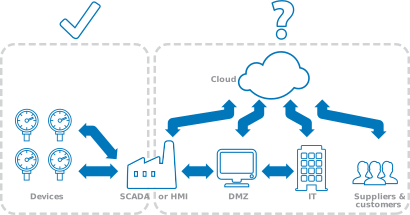
MQTT was designed and implemented a decade before the IoT was even a concept.  It is a lightweight protocol created to connect remote devices to a central location, and was never intended to serve as an IoT backbone.  Plant-level and enterprise-level Industrial IoT applications require support for multiple-hop networking to pass data from device to plant to DMZ to IT to cloud.  The MQTT Quality of Service guarantees are fragile across multiple connections, and it does not handle data overloads well.  For these reasons MQTT cannot guarantee consistency of data across multiple connections, just quality of service over a simple, one-hop, device-to-broker link.

Summary: What Is MQTT Good For?

MQTT is a good edge protocol.  It is lightweight, built for transporting real-time sensor and actuator data. For connecting devices at the edge to a plant or other central location, MQTT shines.  But it would not be wise to rely on it as an enterprise-wide solution.  It was not designed for large, complex Industrial IoT applications that require guaranteed consistency of data from the source to SCADA and HMIs, then through multiple hops and DMZs to IT and AI systems.  MQTT provides a quick and secure way to move data from edge devices to a central location, where a more robust IoT backbone protocol like DHTP can deliver it throughout the enterprise.

  • Top 5 reasons MQTT is good for Industrial Systems
  • How MQTT fits in modern IIoT architecture
  • What is the difference between MQTT and Sparkplug?
  • Sparkplug vs MQTT: Which to choose for your OT system?
Left-open Left-open Go Back to MQTT Guide
Cogent DataHub footer logo white
  • Download
  • Products
  • Purchasing
  • Learning Hub
  • Support
  • About
  • Back to Top
  • LinkedIn iconTwitter iconYouTube icon

Skkynet
302-2233 Argentia Road
Mississauga, ON L5N 2X7

International: 1-905-702-7851
US toll free: 1-888-702-7851

[email protected]
[email protected]
[email protected]
[email protected]

© 2026 Skkynet | All rights reserved | Legal notices
Scroll to top Scroll to top Scroll to top

We are using cookies to give you the best experience on our website.

You can find out more about which cookies we are using or switch them off in .

Cogent DataHub Logo
Powered by  GDPR Cookie Compliance
Privacy Overview

This website uses cookies so that we can provide you with the best user experience possible. Cookie information is stored in your browser and performs functions such as recognising you when you return to our website and helping our team to understand which sections of the website you find most interesting and useful.

Strictly Necessary Cookies

Strictly Necessary Cookie should be enabled at all times so that we can save your preferences for cookie settings.

3rd Party Cookies

This website uses Google Analytics to collect anonymous information such as the number of visitors to the site, and the most popular pages.

Keeping this cookie enabled helps us to improve our website.

Cookie Policy

More information about our Cookie Policy