How to convert OPC DA to MQTT
No access to YouTube? Click here to view locally
Summary
- Download and install Cogent DataHub software.
- Start the DataHub.
- Connect to your OPC DA server.
- Connect to your MQTT broker.
For more details and options, see the documentation.
DataHub product used: DataHub IoT Gateway
Transcript
- How to convert OPC DA to MQTT.
- First download and install Cogent DataHub software.
- Start the DataHub, and from the Properties window, select the OPC DA option. Then select “Act as an OPC Client to these servers” and click the Add button.
- Choose an OPC server.
- Set a maximum update of 100 milliseconds for now.
- Leave the other options at the default settings.
- Manually select the points you want to connect to.
- Or choose Load All Items on Server.
- Click OK and Apply.
- Click View Data to see your data in the Data Browser. You are now connected to the OPC DA server.
- Now we will connect the DataHub MQTT Client to the MQTT broker.
- In the DataHub Properties window, select the MQTT Client feature. Check the “Enable MQTT client connections” option to act as an MQTT client to the MQTT broker. Then click the Add button to configure an MQTT client connection.
- In the Connect to MQTT Broker configuration window we will configure standard MQTT. For Azure IoT Hub, Google IoT, AWS IoT Core, or Sparkplug connections, please see the documentation.
- Create a label for this connection. Then enter the host name or IP address for your MQTT broker. Leave the other connection options at the default settings for now.
- Select the points whose data you wish to push to the MQTT broker.
- You can add a prefix segment to every topic to help identify this connection on the MQTT broker. Leave all the other options at the default settings, and click OK.
- Back in the MQTT Client Configuration, you will see the configured connection. Click Apply, and the Status should change to Running.
- You can view your data In another MQTT client. Connect that client to the MQTT broker, and you should be able to access the OPC DA messages.
- Now you are connected. OPC DA data is being sent to the MQTT broker.
Background
MQTT is a messaging protocol used in many Industrial IoT (IIoT) applications. It allows clients to connect using a publish/subscribe mechanism over TCP/IP. It can support low bandwidth and low latency connections, and can scale up or down as needed.
OPC is a widely-used protocol for connecting industrial hardware and devices with HMIs and other software. It supports communications for thousands of diverse products, keeping costs down for plant owners and hardware suppliers alike. OPC DA, implemented in the 1990s, has a broad, well-established user base.
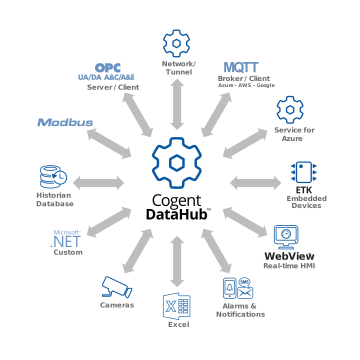
Learning how to convert OPC DA to MQTT using Cogent DataHub software is a good way to integrate these two protocols, and seamlessly connect production data to cloud services and other MQTT applications.
Skkynet provides Cogent DataHub secure-by-design software and services to let you acquire, aggregate, monitor, control visualize, and network live process data in-plant or over insecure external networks, making it ideal for OT to IT and cloud connections. You can isolate control networks from cyber attacks and integrate industrial data under a unified namespace, all without compromising the plant.