• Download
  • Products
    • Product Highlights
      • DataHub Smart MQTT Broker
      • DataHub IoT Gateway
      • DataHub OPC Gateway
      • DataHub service for Azure
      • DataHub OPC Bridge
      • OPC DataHub
      • DataHub WebView
      • DataHub Modbus OPC Server
    • Tunnellers
      • DataHub UA Tunneller
      • DataHub DA Tunneller
      • DataHub Tunnel A&E
      • DataHub Modbus Tunneller
      • DataHub DDE Tunneller
      • Individual Features
        • Redundancy
        • Data Diode Mode
        • Monitoring
    • Historians
      • Connect to InfluxDB
      • Connect to Amazon Kinesis
      • Connect to AVEVA Historian
      • Connect to AVEVA Insight
      • Connect to AVEVA PI
      • Connect to RESTful Systems
      • Connect to Kafka
      • Connect to ODBC
      • Connect to Azure Event Hubs
      • Connect to OPC Classic HDA
    • Notifications
      • Alarm and Notification
      • Email / SMS
      • OPC A&E support
      • OPC UA A&C support
    • Excel and DDE
      • DataHub Add-In
        for Microsoft Excel
      • DDE / Excel
    • Loggers
      • DataHub OPC Logger
      • DataHub Modbus Logger
  • Purchasing
    • How to Purchase
    • Request a Quote
    • Feature Matrix
    • Software Subscription Plan
    • Maintenance Support Plan
    • Educational Program
  • Learning Hub
    • Industries & Use Cases
      • Wind & Solar
      • Conventional Energy
      • Oil & Gas
      • Minerals & Mining
      • Manufacturing
      • Food & Beverage
      • Pharma & Healthcare
      • System Integration
      • Machines & Tools
    • Knowledge Center
      • Videos
      • Webinars
      • How-To
      • Case Studies
      • White Papers
      • Essential Guides
        • MQTT & Sparkplug Essentials
        • DataHub Security Essentials
    • Connecting
      • Industrial AI
      • Industrial IoT
      • Secure OT to IT
      • OPC
      • Historian
      • MQTT
        • Sparkplug
      • Database
      • Modbus
      • Excel
      • Web
      • Embedded
      • Open APIs
      • DHTP
      • Architecture
  • Support
    • FAQ
    • Documentation
    • Release Notes
    • Technical Specifications
  • About
    • Partners
    • Customers
    • Testimonials
    • Privacy Policy
    • Terms of Use
    • Legal Notices
  • Click to open the search input field Click to open the search input field Search
  • Menu Menu
  • Download
  • Products
    • DataHub Smart MQTT Broker
    • DataHub IoT Gateway
    • DataHub OPC Gateway
    • DataHub service for Azure
    • DataHub OPC Bridge
    • OPC DataHub
    • DataHub WebView
    • DataHub Modbus OPC Server
    • Tunnellers
      • DataHub UA Tunneller
      • DataHub DA Tunneller
      • Tunnel A&E
      • DataHub Modbus Tunneller
      • DataHub DDE Tunneller
    • Historians
      • Connect to InfluxDB
      • Connect to Amazon Kinesis
      • Connect to AVEVA Historian
      • Connect to AVEVA Insight
      • Connect to AVEVA PI
      • Connect to RESTful Systems
      • Connect to Kafka
      • Connect to Azure Event Hubs
      • Connect to ODBC
      • Connect to OPC Classic HDA
    • Notifications
      • Alarm and Notification
      • Email / SMS
      • OPC A&E support
      • OPC UA A&C support
    • Excel and DDE
      • DataHub Add-in for Microsoft Excel
      • DDE / Excel
    • Loggers
      • DataHub OPC Logger
      • DataHub Modbus Logger
      • Monitoring
    • Individual Features
      • Redundancy
      • Data Diode Mode
      • Monitoring
  • Purchasing
    • How to Purchase
    • Request a Quote
    • Feature Matrix
    • Software Subscription Plan
    • Maintenance Support Plan
    • Educational Program
  • Learning Hub
    • Industries & Use Cases
      • Wind and Solar
      • Conventional Energy
      • Oil & Gas
      • Minerals & Mining
      • Manufacturing
      • Food and Beverage
      • Pharma and Healthcare
      • System Integration
      • Machines and Tools
    • Knowledge Center
      • Videos
      • Webinars
      • How-to
      • Case Studies
      • White Papers
    • Essential Guides
      • MQTT and Sparkplug Essentials
      • DataHub Security Essentials
    • Connecting
      • Industrial AI
      • Industrial IoT
      • Secure OT to IT
      • OPC
      • Historian
      • MQTT
        • Sparkplug
      • Database
      • Modbus
      • Excel
      • Web
      • Embedded
      • Open APIs
      • DHTP
      • Architecture
  • Support
    • FAQ
    • Documentation
    • Release Notes
    • Technical Specifications
  • About
    • Partners
    • Customers
    • Testimonials
    • Privacy Policy
    • Terms of Use
    • Legal Notices

How to convert OPC DA to OPC UA

國語 中文
https://cogentdatahub.com/media/video/datahub-opc-da-to-ua-chi-chinese.mp4
English
https://cogentdatahub.com/media/video/datahub-opc-da-to-ua-eng.mp4
Français
https://cogentdatahub.com/media/video/datahub-opc-da-to-ua-fre-french.mp4
Deutsch
https://cogentdatahub.com/media/video/datahub-opc-da-to-ua-ger-german.mp4
日本語
https://cogentdatahub.com/media/video/datahub-opc-da-to-ua-jap-japanese.mp4
Español
https://cogentdatahub.com/media/video/datahub-opc-da-to-ua-spa-spanish.mp4

No access to YouTube? Click here to view locally

Summary

  1. Download and install Cogent DataHub software.
  2. Start the DataHub.
  3. Connect to your OPC DA server.
  4. Connect your OPC UA client.

For more details and options, see the documentation.

DataHub product used: DataHub OPC Gateway

Transcript

  1. How to convert OPC DA to OPC UA.
  2. First, download and install Cogent DataHub software.
  3. We will start by connecting to the DA server.
  4. Start the DataHub, and from the Properties window, select the OPC DA option and click the Add button.
  5. Choose an OPC server.
  6. Enter the Data Domain Name “OPC DA server.”
  7. Set a maximum update of 100 milliseconds for now.
  8. Leave the other options at the default settings.
  9. Manually select the points you want to connect to.
  10. Or choose Load All Items on Server.
  11. Click OK and Apply.
  12. Click View Data to see your data in the Data Browser.
  13. Now you are connected to the OPC DA server.
  14. Next we will connect the OPC UA client.
  15. In the DataHub Properties window, select the OPC UA option.
  16. Make sure the box for Act as an OPC UA Server is checked, and the protocols you need are also checked.  Then click Apply.
  17. To enable remote connections, select Security and then click the Configure button.
  18. Under Users, click the Add button to add a Built-In User.
  19. Enter a username and password.
  20. Uncheck the Require TOTP Authentication box because this is a non-interactive connection.  Then click OK.
  21. In the Roles, check the All Data Full Access box.  Then click OK. This DataHub instance is now configured as an OPC UA server.
  22. In your OPC UA client, add the Cogent DataHub server.  To connect remotely, you will need to enter the username and password.  Then select your nodes.
  23. Now your OPC DA server is connected to your OPC UA client.

Background

OPC Classic Data Access (OPC DA) is a legacy protocol with a wide user base. OPC UA is the latest protocol from the OPC Foundation.  Learning how to convert OPC DA to OPC UA with Cogent DataHub software is a good way to integrate these two protocols, and make them available to all of the other supported protocols, like OPC A&E, A&C, MQTT, Modbus, ODBC, and more.

Skkynet provides Cogent DataHub secure-by-design software and services to let you acquire, aggregate, monitor, control visualize, and network live process data in-plant or over insecure external networks. You can isolate control networks from cyber attacks and integrate industrial data under a unified namespace, all without compromising the plant.
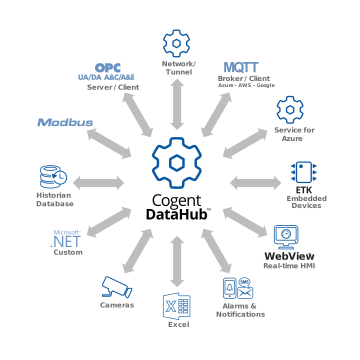
Cogent DataHub products wheel diagram

How-to Videos


Basic Connections:

Connect to an OPC UA server
Connect to an OPC DA server
Connect an OPC UA client
Connect an OPC DA client
Connect an MQTT client
Connect to an MQTT broker

Protocol Conversions:

Convert OPC DA to OPC UA
Convert OPC UA to OPC DA
Convert OPC DA to MQTT
Convert OPC UA to MQTT
Convert MQTT to OPC DA
Convert MQTT to OPC UA

Tunnelling:

Tunnel OPC UA – outbound
Tunnel OPC DA – outbound
Tunnel OPC DA – inbound

Advanced:

Use a DataHub script
Configure Redundancy
Connect time-series data to ODBC

Connect through a Data Diode:

Connect OPC UA thru Data Diode
Connect OPC DA thru Data Diode
Connect MQTT thru Data Diode to Client
Connect MQTT thru Data Diode to Cloud

Connect through a DMZ:

Connect OPC UA thru DMZ
Connect OPC DA thru DMZ
Connect MQTT thru DMZ
Cogent DataHub footer logo white
  • Download
  • Products
  • Purchasing
  • Learning Hub
  • Support
  • About
  • Back to Top
  • LinkedIn iconTwitter iconYouTube icon

Skkynet
302-2233 Argentia Road
Mississauga, ON L5N 2X7

International: 1-905-702-7851
US toll free: 1-888-702-7851

[email protected]
[email protected]
[email protected]
[email protected]

© 2026 Skkynet | All rights reserved | Legal notices
Scroll to top Scroll to top Scroll to top

We are using cookies to give you the best experience on our website.

You can find out more about which cookies we are using or switch them off in .

Cogent DataHub Logo
Powered by  GDPR Cookie Compliance
Privacy Overview

This website uses cookies so that we can provide you with the best user experience possible. Cookie information is stored in your browser and performs functions such as recognising you when you return to our website and helping our team to understand which sections of the website you find most interesting and useful.

Strictly Necessary Cookies

Strictly Necessary Cookie should be enabled at all times so that we can save your preferences for cookie settings.

3rd Party Cookies

This website uses Google Analytics to collect anonymous information such as the number of visitors to the site, and the most popular pages.

Keeping this cookie enabled helps us to improve our website.

Cookie Policy

More information about our Cookie Policy