5.2. How-To Scenarios
There are three main tunnel/mirror scenarios, depending on how secure a connection you need.
Both Firewalls Open, Inbound Often used for networking OPC Classic DA to avoid DCOM, as well as for OPC A&E or other data. Most effective on a secure, isolated network.
One Firewall Closed, Outbound For securely accessing data from outside the control network, without VPNs.
Both Firewalls Closed, with DMZ The most secure way to transmit data over insecure networks, without VPNs. It uses a DMZ (demilitarized zone) to completely isolate networks, as recommended by the NIS2 Directive, NIST CSF 2.0, and leading security experts worldwide.
5.2.1. Both Firewalls Open, Inbound
Primary Use For connecting OPC DA, A&E or other data over a secure, isolated network, avoiding DCOM.
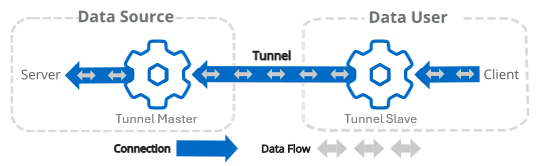
On the Data Source side, connect the DataHub instance to the data source.
Still on the Data Source side, configure the DataHub instance as tunnel master.
Move to the Data User side and configure the DataHub instance as tunnel slave, making sure to configure these options as follows:.
For Data Flow Direction: choose for one-way, or for bidirectional data flow
For When Connection Initiated: choose
For When Connection Lost: choose
These options are configured this way because the tunnel master acts as the authoritative data source.
Still on the Data User side, connect the data user to the DataHub instance.
See also Tunnelling Security - Best Practices.