5.2.3. Both Firewalls Closed, with DMZ
Primary Use Securely transmit data over insecure networks, without VPNs.
![[Note]](images/note_1156523861.png) | |
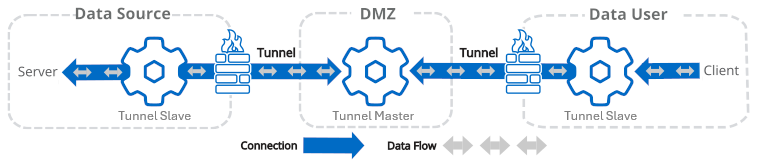
Since slaves initiate the connection to the tunnel master, the DataHub instance on the DMZ is the tunnel master, and both the other DataHub instances are tunnel slaves. |
On the DMZ, configure the DataHub instance as tunnel master.
Move to the Data Source side, and connect the DataHub instance to the data source.
Still on the Data Source side, configure the DataHub instance as tunnel slave, making sure to configure these options as follows:
For Data Flow Direction: choose for one-way, or for bidirectional data flow
For When Connection Initiated: choose .
For When Connection Lost: choose .
These options are set this way because for this first part of the tunnel, the tunnel slave acts as the authoritative data source.
Move to the Data User side and configure this DataHub instance also as tunnel slave, making sure to configure these options as follows:
For Data Flow Direction: choose for one-way, or for bidirectional data flow
For When Connection Initiated: choose .
For When Connection Lost: choose .
These options are set this way because for this second part of the tunnel, the tunnel master on the DMZ is the authoritative data source.
Connect the data user to the DataHub instance.
See also Tunnelling Security - Best Practices.