5.3. Configuring the Tunnel Master
The tunnelling master DataHub instance receives the initial request from a tunnelling slave to establish the tunnelling connection, initially or after a network break. Once the connection is established the two DataHub instances are indistinguishable from each other; both will send and receive data changes.
![[Important]](images/important_2051192373.png) | |
You must allow Remote Connections in Security for any incoming connections over the network. |
Right click on the DataHub system-tray icon and choose .
In the Properties window, select Tunnel/Mirror.

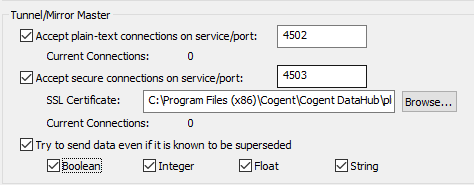
In the Tunnelling Master section, you can configure plain-text or secure tunnelling. Ensure that at least one of these is checked. If you want to change any of the other defaults, please refer to Tunnel/Mirror in the Properties Window chapter for more information.
![[Note]](images/note_1156523861.png)
To optimize throughput, un-check the Try to send data even if it is known to be superseded option. This will allow the DataHub instance to drop stale values for points which have already changed before the client has been notified of the original change. The latest value will always be transmitted.
To support incoming WebSocket connections from DataHub tunnelling clients, you will need to configure the tunnelling master DataHub instance's Web Server. For WebSocket connections, we recommend using SSL, on port 443.
Click to close the Properties window.