11.2. Configuring the DataHub Web Server
To configure the DataHub Web Server, follow these steps:
With a DataHub instance running, right click on the DataHub system-tray icon and choose .
In the Properties window, select Web Server
 .
.Check the Act as web server box.

The DataHub Web Server is preconfigured to run on port number 80, but you might need to change that setting in the Base Configuration section:

![[Note]](images/note_1156523861.png)
When using the DataHub Web Server to support WebSocket connections, we recommend using SSL.
When using SSL, we recommend using port 443.
![[Important]](images/important_2051192373.png)
Windows allows multiple users on a single TCP port, and never refuses a connection. However, this can cause irregular behavior. It is essential that the DataHub Web Server be the exclusive user of a port.
To get a list of which ports are in use on your machine, follow these steps:
From the Windows menu, choose .
Enter the executable name
cmd.exeand click .At the command prompt, type:
netstat -p tcp -b -a -n
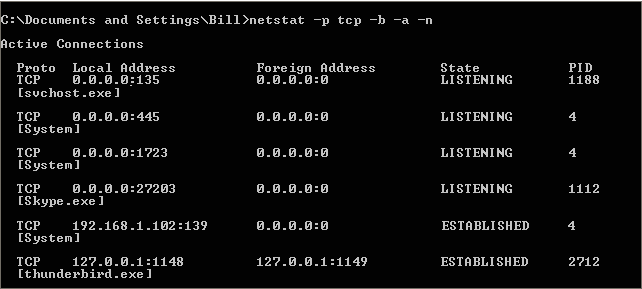
The result is a table showing the tcp protocol and executable name of all programs in use. There are two columns of interest:
Local AddressandState. InLocal Address, the numbers at the end (after the colon) are the port number that the process is using. TheStatecolumn shows the state of that process. The only state we are interested in isLISTENING. Whatever port you are using for the DataHub Web Server, it should be the only process on that port.
If you have one or more programs established or listening on the same port as the DataHub instance, you have two choices:
Change the port number for the DataHub Web Server (as illustrated above), or
Change the port number for every other program that is using that port.
Port numbers
1through1024are reserved. Port80, for example, is reserved for HTTP, which is why we make it the default for the DataHub Web Server. If you change the DataHub Web Server from port80, we suggest setting it to a number between1025and65535.Configure any desired options, according to these guidelines:
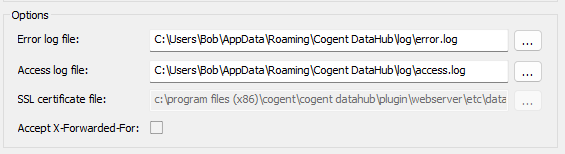
- Error log file:
The path and name of the file where errors are logged.
- Access log file:
The path and name of the file where access attempts, successes, and failures are logged.
- SSL certificate file:
The path and name of the certificate file used for secure sockets (SSL). Please see SSL Certificates for more information about SSL certificates in the DataHub program.