15.3. Restricting Access
You can restrict access based on a specific communication protocol, IP address pattern, or DataHub data domain.
Each time a user logs in, the system creates a list of all principals that match
the connecting protocol. Within the list, the system selects the closest CIDR (IP
address) match. That is, the one with the most bits in the CIDR that match the
incoming address. The protocol option of asterisk ( * ) is always
a match. For example, if you have these 2 principals:
192.168.0.0/16    MQTT
192.168.0.0/24    MQTT
An incoming MQTT connection from 192.168.0.10 would match the
second CIDR. An MQTT connection from 192.168.1.10 would match the
first CIDR. The system chooses the principal with the closest CIDR match to the
incoming address for the incoming protocol.
Additionally, the connection can be restricted to a single data domain or pattern of domains, using a customized role for each principal.
15.3.1. Protocol restrictions
To limit a user to a single communication protocol for accessing data, you need to edit or add a principal for that user. This following example edits an existing principal, based on the example NetworkUser user created in the Remote Connections section.
Among the Principals of the user, select the principal you want to modify and click the button.
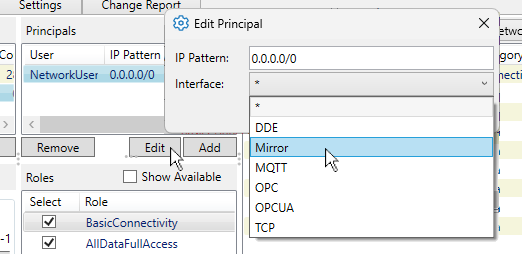
From the Interface drop-down list, select a protocol, such as Mirror, to restrict this user to only Tunnel/Mirror connections.
After making this addition, your
NetworkUseruser would now look like this:
Click the button to apply the changes.
This restricts all incoming connections from NetworkUser to tunnel/mirror connections. The IP pattern of this principal could also be edited, or other principals can be added to this user, to enable other permission scenarios, as explained in the next section.