3.16.3. Supported Historians
The External Historian feature supports these connections.
| Amazon Kinesis |
| Apache Kafka |
| AVEVA CONNECT |
| AVEVA Historian |
| AVEVA Insight |
| AVEVA PI |
| Azure Event Hubs |
| InfluxDB V1 |
| Influx V2 |
| ODBC |
| OPC Classic HDA |
| REST Client |
| Tunnel (Push) |
| Tunnel (Pull) |
3.16.3.1. Amazon Kinesis
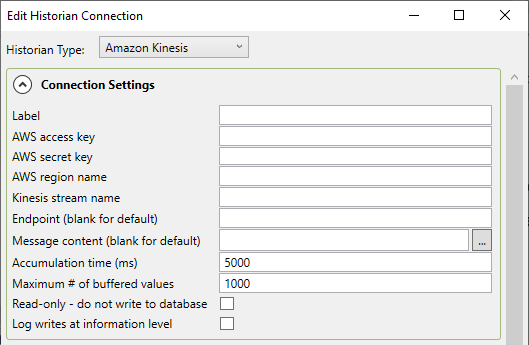
From the Edit Historian Connection window you can select Amazon Kinesis.
Connection Settings
- Label
A unique text string used to identify this connection. This label is used to identify the connection when configuring store and forward, and to create the database name or retention policy in some historians. The label can contain only letters, numbers and the underscore (
_) character.- AWS access key
The access key ID for an AWS account user that has permission to write to the Kinesis stream.
- AWS secret key
The secret key that AWS has assigned to the above user.
- AWS region name
The AWS region code, such as
us-east-1, that is associated with the data stream.- Kinesis stream name
The name that you have chosen for the data stream, as configured in Kinesis.
- Endpoint (blank for default)
If you have configured a different endpoint for the data stream on AWS, you can enter it here.
- Message content (blank for default)
Specify a document format in ASP, if you need to. The "
..." button opens the script editor with common
formulas and examples to help edit a message.
opens the script editor with common
formulas and examples to help edit a message.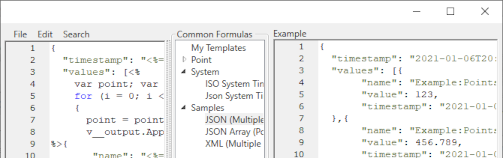
- Accumulation time (ms)
The number of milliseconds that the DataHub instance will buffer data in memory before sending it to Kinesis. Setting this value to zero means that no accumulation time will be enforced.
![[Important]](images/important_2051192373.png)
Since AWS pricing is based on the number of messages received, this option allows you to reduce your costs by sending messages in batches.
If both this value and Maximum # of buffered values (below) are specified, then the DataHub instance will write all buffered values to Kinesis whenever the first of these two limits is reached.
- Maximum # of buffered values
The maximum number of values that the DataHub instance will buffer in memory before transmitting them to Kinesis. Setting this value to zero means that all values will be sent as soon as possible.
- Log writes at information level
Checking this option causes messages regarding successful writes to the database to be logged at the level in the DataHub Event Log. If this is not checked then these messages are logged at the level and are therefore normally hidden from the user.
Modify Point Names, Data Sampling and Forwarding
Please see Modify Point Names, Data Sampling or Forwarding in Connection Configuration for how to configure these options.
Once you have completed the Amazon Kinesis-specific configuration, you can return to Picking Points in General Options to continue.