3.16.3.12. OPC Classic HDA
From the Edit Historian Connection window you can select OPC Classic HDA. This enables the DataHub instance to store data to, and query data from, an OPC HDA historian.
Connection Settings
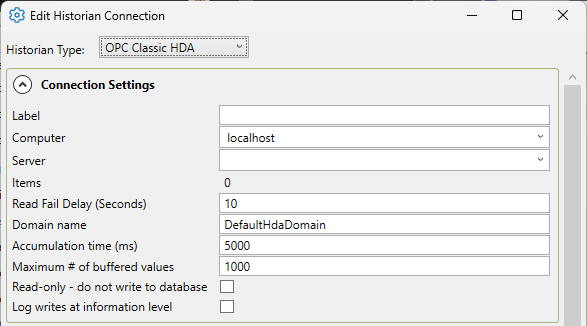
- Label
A unique text string used to identify this connection. This label is used to identify the connection when configuring store and forward, and to create the database name or retention policy in some historians. The label can contain only letters, numbers and the underscore (
_) character.- Computer
The computer name for the computer running the Classic HDA historian.
- Server
The name of the HDA server.
- Items
The number of HDA items selected.
- Read Fail Delay (Seconds)
The amount of seconds between attempting another read, if a read has failed. This is to stop the DataHub instance from constantly querying the HDA server for a point that is producing a fail.
- Domain Name
The DataHub domain in which the HDA points are listed.
- Accumulation time (ms)
The number of milliseconds that the DataHub instance will buffer data in memory before sending it to the HDA historian. Setting this value to zero means that no accumulation time will be enforced.
If both this value and Maximum # of buffered values (below) are specified, then the DataHub instance will write all buffered values to Kinesis whenever the first of these two limits is reached.
- Maximum # of buffered values
The maximum number of values that the DataHub instance will buffer in memory before transmitting them to the HDA historian. Setting this value to zero means that all values will be sent as soon as possible.
- Read-only - do not write to database
Prevents the DataHub instance from writing to the HDA historian.
- Log writes at information level
Checking this option causes messages regarding successful writes to the database to be logged at the level in the DataHub Event Log. If this is not checked then these messages are logged at the level and are therefore normally hidden from the user.
Modify Point Names, Data Sampling and Forwarding
Please see Modify Point Names, Data Sampling or Forwarding in Connection Configuration for how to configure these options.
Once you have completed the OPC HDA-specific configuration, you can return to Picking Points in General Options to continue.