3.16.3.6. AVEVA PI
From the Edit Historian Connection window you can select for reading and/or writing data. The DataHub instance uses the PI Web API to communicate with the PI historian either locally or over a network connection. Read and write transactions take place over HTTPS.
Connection Settings
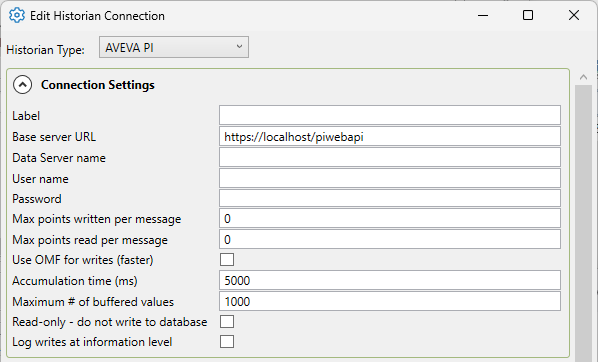
- Label
A unique text string used to identify this connection. This label is used to identify the connection when configuring store and forward, and to create the database name or retention policy in some historians, like InfluxDB. The label can contain only letters, numbers and the underscore (
_) character.- Base server URL
The PI Web API endpoint. This will be
https://, wherehostname[:port]/piwebapihostnameis the host name or IP address of the server running PI. If the PI Web API service is configured to use a port other than 443, you must also include a colon followed by the port number. E.g.,https://192.168.1.17:8080/piwebapi- Data Server name
The Data Server name for the PI Server.
- User name
The user name used to authenticate this connection. You must configure users and passwords in the PI Server.
- Password
The password associated with the User name.
- Max points written per message.
This is the maximum number of values that the DataHub instance will write in a single transaction. If the DataHub instance has more values waiting to be transmitted, it will break the values into multiple transactions of this size or less.
- Max points read per message.
The maximum number of values that will be read in a single transaction. By default, PI limits reads to not more than 150,000 values. You can set this to a lower number to reduce the chance that a large query will cause delays in the PI Server. If necessary, the DataHub instance will use multiple read transactions to fully retrieve data over a period.
- Use OMF for writes (faster)
The PI Web API offers two endpoints for writing data to the PI archive, the standard web API, and OMF. The PI Web API is a flexible interface designed for reading, writing and maintenance of the PI server. OMF is a narrowly defined interface dedicated to high-speed data ingestion to PI. Data written using the OMF interface is asynchronous, which allows for much faster data delivery. Writing using OMF can be 10x to 40x faster than writing with the PI Web API.
Since OMF is asynchronous, it is not possible to detect when a write fails. If a user does not have permission to write to a point, or the point is incorrectly configured, or the point has been deleted, a write via OMF will succeed and you will get no indication that data was not stored.
If the configuration for a point changes, e.g., the data type is changed, writes via OMF will appear to succeed, and might in fact succeed, depending on how the configuration has changed. To re-align data writes with the point configuration changes, stop the connection to PI and then restart it. The connection initialization will reload the point configuration data and update the OMF properties to match.
- Accumulation time (ms)
The number of milliseconds that the DataHub instance will buffer data in memory before sending it to PI. Setting this value to zero means that no accumulation time will be enforced, in which case Maximum # of buffered values will determine how frequently data is written.
- Maximum # of buffered values
The maximum number of values that the DataHub instance will buffer in memory before transmitting them to PI. Setting this value to zero means that values will not be buffered, but instead will be sent as soon as they are available.
The DataHub instance buffers values before transmitting them to PI to improve network efficiency. The two options, Accumulation time and Maximum # of buffered values, represent alternate ways to express the limit on that buffering. The DataHub instance will transmit accumulated values when either the maximum number of buffered values or the accumulation time is reached, whichever comes first.
- Read-only - do not write to database
Prevents the DataHub instance from writing to AVEVA PI.
- Log writes at information level
Checking this option causes messages regarding successful writes to the database to be logged at the level in the DataHub Event Log. If this is not checked then these messages are logged at the level and are therefore normally hidden from the user.
Point Settings

- Create non-existent PI points
This option will create points from the history data set if they do not yet exist in PI. If point creating fails, and Ignore non-existent PI points is true, then the non-created points will be removed from the input data set. If Ignore non-existent PI points is false, the current values will be discarded and creation will be attempted again when new values arrive for that point.
- Ignore non-existent PI points
This option will remove any points from the input data set that do not exist in the PI archive. Future attempts to write to these points will be ignored.
PI Web API Settings

- Maximum write thread count
The maximum number of threads the DataHub instance will use for sending values. A setting of
0will write synchronously. A setting of1will write asynchronously with a single thread. Settings greater than1will split the data into multiple chunks and write each chunk in a separate thread. This might improve write performance somewhat, particularly on networks with long latency.- Buffer option
DoNotBuffer - Bypass the PI buffer and write directly to the PI archive. The write will fail if the PI Point is already being buffered.
BufferIfPossible - Use the PI buffer if it is available.
Buffer - Always use the PI buffer. If the PI buffer is not configured, the write will fail.
- Update option
Replace - If a new value for a point has the same timestamp as a previous value, replace the previous value with the new value. This option disables compression for this write. Use Insert to apply compression.
Insert - Add a new value for the point even if the timestamp matches a previous value.
NoReplace - If a new value for a point has the same timestamp as a previous value, discard the new value.
ReplaceOnly - If there is no current value for the point at the given timestamp, discard the new value.
InsertNoCompression - Insert, but do not compress even if compression is configured for the point.
Remove - If a value exists at the specified time, remove it. Do not insert anything into the PI archive.
OMF Settings

- Point source for new points
If new points are created while Use OMF for writes (see above) is selected, this sets the point source in PI for the newly created points. It will not alter the point source for an existing PI Point.
- Type name prefix
Points written using OMF require custom types (Asset Framework element templates) to be created before writing. The custom type name must be unique in the database. This option sets a prefix for the custom type names that will be created during the connection initialization. For example, a type name prefix of
Mywill create types:MybooleanMydate-timeMyfloat32Myfloat64Myint16Myint32Myint64MystringMyuint16Myuint32Myuint64- Detailed error messages
When the connection is initialized, type mismatch errors could be generated, one for each PI point. When this setting is enabled, an error message is written to the DataHub Event Log for each point. When this setting is disabled, an amalgamated error message is written to the Event Log for all points in a batch.
Modify Point Names, Data Sampling and Forwarding
Please see Modify Point Names, Data Sampling or Forwarding in Connection Configuration for how to configure these options.
Once you have completed the AVEVA PI-specific configuration, you can return to Picking Points in General Configuration to continue.