15.7. MQTT per-topic permissions
This option applies DataHub Security features to configure granular access control on portions of the MQTT topic space. It specifies an ordered collection of rules, where each rule specifies the permissions for a role on a per-topic or per-topic-pattern basis. Every principal that is a member of that role receives the configured permissions. Permissions are applied in the order they appear in the list, with the exception of user and client name patterns, which are always applied after topic names and topic patterns. The first matching rule will determine the permissions for any PUBLISH (write) or SUBSCRIBE (read) requests made on a connection.
Topics may contain wildcards following the MQTT topic syntax. A +
character in the topic path matches a specific segment in the topic, and a
# character matches all topics that start with the segments preceding
the # character. See the MQTT specification for more details.
In addition, you can supply user and client name patterns. The string
%u will be replaced with the username supplied for this
connection. The string %c will be replaced with the MQTT client ID
for this connection. Rules that include the %u and
%c patterns will be evaluated after all other topic patterns, in
the order that they appear in the list.
If no rule matches a request, the request is denied.
Example
Here is an example of a user-based rule. Designated users at each of three companies need access to the data for their company only. This configuration will give each user private access to the portion of the MQTT topic tree for their own company.
In the DataHub Properties window, select the option and click the button.
Set the Organization to , and in , add or make sure you have are a few users to work with, like
Company1,Company2, andCompany3.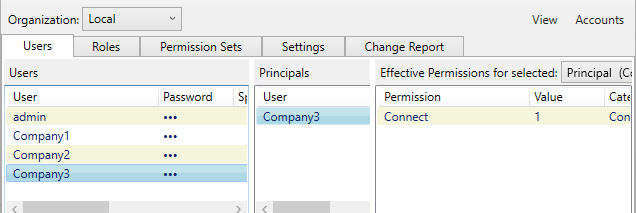
In the Role tab, under Roles, click the button and enter
MqttUserfor the role name.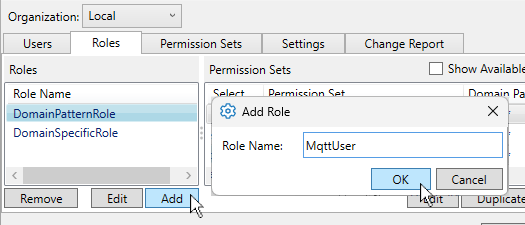
Click to add the role.
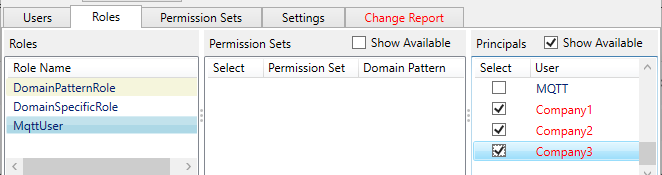
In Principals check the Show available box and select the names of the companies you wish to allow for the MQTTUser.
![[Note]](images/note_1156523861.png)
You do not need to add permissions to this role. Any MQTT permissions assigned here will be ignored when per-topic permissions are enabled. If you want to associate any non-MQTT permissions with this role, you can check the Show Available button to display the options, and choose what you need.
Click to save your work.
Go to the MQTT Broker configuration, and in Options, check the Use per-topic permissions box. Then click the button to open the Edit MQTT Broker Access Control dialog.

Configure the following per-topic permissions:
Topic:
%u/#Access:
ReadWriteRole:
MqttUser
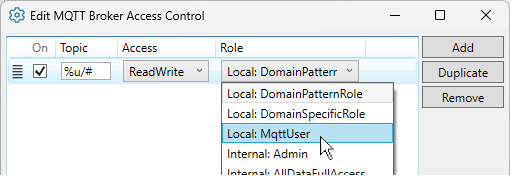
Now each designated MQTT user has private access to the part of the MQTT topic tree that starts with their login name.