Chapter 1. Introduction
The DataHub WebView program is a state-of-the-art, rich internet application for designing and delivering high-quality, real-time displays in Windows Desktop or Internet Explorer. All page creation and editing is done using a built-in editor, and page updates can be automatically published as soon as changes are saved. Page designers have access to standard controls, gauges, and 4,000 industry-standard symbols, each of which can be easily configured to recognize condition states and to graphically notify operators of process status and anomalies. All controls feature powerful, "anything-to-anything" data binding.

Advantages of the DataHub WebView application
Edit screens anywhere Just open your web browser, type the address of your DataHub Web Server, log in to the system and, based on your access permissions, you can build, edit and view WebView screens from anywhere with network/Internet access.
No coding required Build all your screens using the powerful built-in graphical environment. Complete point and click freedom, with no code in sight.
No development system required You do not need to install a development system on your computer in order to build WebView screens. The development interface is provided to you, in your browser, by the web server. No compiler necessary.
No deployment required Because the screens you build in the WebView application are saved on the web server, you never have to deploy your changes to other users. When you are editing a page and you want to show your colleagues, you simply save your changes, and tell your team to reload the page in their browser. No deployment, no complicated file updates.
Collaborate on development With no limit to the number of users accessing the system, you can have a team of developers building pages at the same time. Depending on the permissions you give to your team members you can have them edit everyone's pages, or restrict access so they can only edit the pages they build.
Build entire multi-page HMI applications with hyperlinks between pages, just like a web site or standard HMI system.
Security at every level The permissions based security model allows you to define very precise privileges to each user. You can define certain users to have read only access, while other can view and make changes but not access the development interface. In the WebView application, the security model was one of the fundamental primary requirements, not an afterthought.
Specify sophisticated graphical interactions between controls using the WebView application's powerful property binding feature. Property binding allows you to associate the input values for one control, with the properties of other controls. Simpler to do than to describe, this saves you time and adds significant power to your WebView screen.
Comes with a standard set of built-in controls such as trends, gauges and sliders. In addition, the WebView application also ships with a complete set of Symbol Factory™[5] symbols, which offer thousands of industry standard symbols for a variety of industries. The WebView application is able to provide these and other future third party symbols.
1.1. Run Locally
To run the WebView application on your local computer, from the Start menu go to the Cogent programs and select the WebView program.

This will open the WebView log-in screen:

To log in, enter
Local,admin,adminfor Organization, Username and Password, respectively. To change user name or password, please refer to DataHub Security. For details about connection options, please see Advanced Launch Options. And for DataHub configuration options, please see DataHub Configuration.Logging in will open the WebView interface:
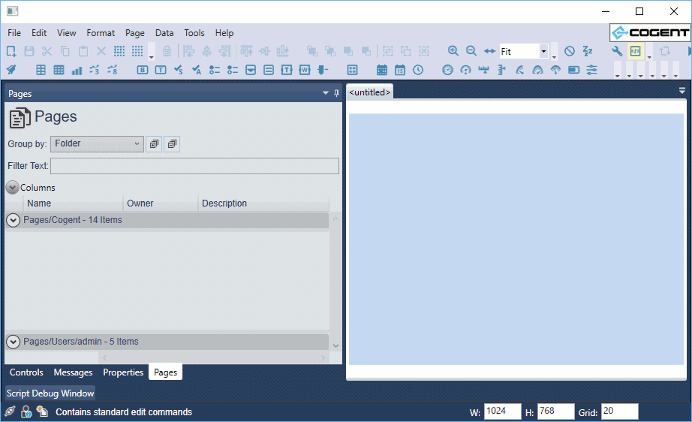
You are now ready to start creating pages.
[5] Symbol Factory™ is a trademark of Reichard Software Corporation. Symbol Factory graphics are included with the WebView application under license from Software Toolbox and Reichard Software Corporation.