1.5. DataHub Security
For Cogent DataHub program users, once you have tested the WebView application with the
default username and password (admin, admin),
you may want to change the admin password or add other users with
different access permissions. Here is how you can do that.
Start a DataHub instance, right click on the Cogent DataHub system-tray icon and choose .
In the Properties window, select Security
 .
.Click the button to open the Edit Permissions window.
Click on the Users tab and create a new user, for example WebViewUser.
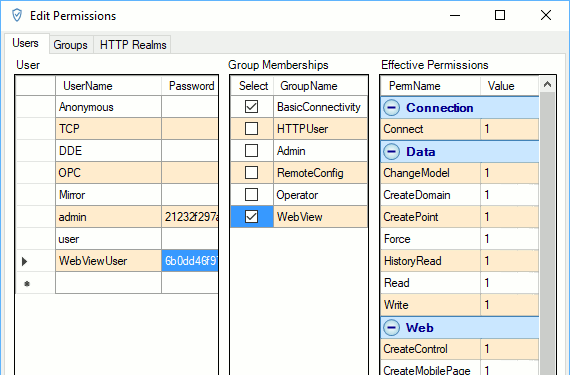
You can now assign access permissions for this user. To give permission to access all WebView features as well as read/write permissions on data, check the and boxes. You can also create custom groups with more restricted permissions, and assign users to them. Please refer to Security for more information.
When you are finished, click the button.