Chapter 14. Using the External Historian
14.1. Typical Scenarios
Here are some typical scenarios for working with an External Historian.
External Historian 1 - Local Connection
For storing data on an external historian running on the same computer as the DataHub instance. This can be used with any supported historian. See Connecting.
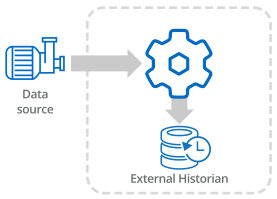
External Historian 2 - Networked Connection
For storing data on a networked external historian. This can be used with any supported historian. See Connecting.

The DataHub program supports AVEVA's store-and-forwarding functionality for AVEVA Historian and AVEVA Insight over this kind of networked connection.
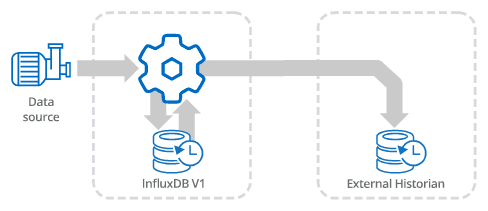
External Historian 3 - Local and Networked Connection for Store & Forward
For storing data on a local external historian, and forwarding it to a networked external historian. The local historian must be InfluxDB for this scenario. And because InfluxDB is supported only on 64-bit Windows operating systems, the OS must be 64-bit.
The networked historian can be any supported historian. This involves creating two historian connections. The first connection stores data from the data source into the local historian, and the second retrieves data from the local historian and writes it to the networked historian. See Store and Forward.
In many cases it is more secure to send the External Historian data across a tunnel. Here are some typical scenarios:
External Historian 4 - Tunnel (Push)
The DataHub instance on the sending side pushes data from its external historian across a tunnel to the receiving side, where it is stored in an external historian there. The historian on the sending side must be InfluxDB. The historian on the receiving side can be any supported historian. See Tunnel (Push).

Configuration
Sending DataHub instance is a Tunnel Slave that initiates the connection.
Receiving DataHub instance is a Tunnel Master that receives the connection.
External Historian 5 - Tunnel (Pull)
The DataHub instance on the receiving side pulls data from the external historian on the sending side across the tunnel, and stores it in the external historian on the receiving side. The historian on the sending side must be InfluxDB. The historian on the receiving side can be any supported historian. See Tunnel (Pull).

Configuration
Sending DataHub instance is a Tunnel Master that receives the connection.
Receiving DataHub instance is a Tunnel Slave that initiates the connection.
External Historian 6 - Tunnel through DMZ
This scenario daisy chains a tunnel push and a tunnel pull through a DMZ. The DataHub instance on the sending side pushes data to the DataHub instance on the DMZ, which stores it in InfluxDB. At the same time, the DataHub instance on the receiving side pulls the data from the DMZ DataHub instance and stores it in its historian, the final destination. This high-security configuration allows you to keep firewalls on both the sending and receiving side closed. See Using a DMZ.
The historians on the sending side and the DMZ must both be InfluxDB. The historian on the receiving side can be any supported historian.

Configuration
Sending DataHub instance is a Tunnel Slave that initiates a connection.
DMZ DataHub instance is a Tunnel Master that receives the connections.
Receiving DataHub instance is a Tunnel Slave that initiates a connection.