1.3. User Interface
The WebView user interface is made up of 3 main areas: the Toolbar, the Explorer Panel, and the Design window.
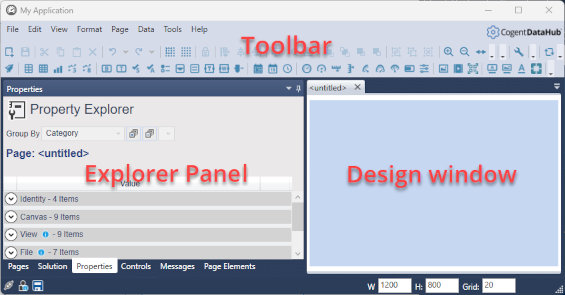
The Toolbar contains all the tools and controls used for building pages.
Pages and controls are described in more detail in the Pages and Controls sections.
The Design window is where you build pages and place controls.
The Explorer Panel has several tabs for displaying details about the pages, controls, and other elements of your WebView project. Here is a brief description of all Explorer Panel tabs available in v11:
Pages lists pages grouped by the page owner, as well as Solutions that contain multiple pages.
Solution provides a way to configure page management settings for a solution, a group of pages held in memory to allow quick switching between them. (See Solutions for details).
Properties gives access to all of the properties of the selected item in the Design window, typically a control or a page.
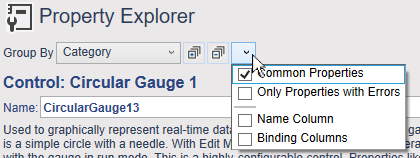
There are options for grouping and sorting properties, as well as for hiding or displaying certain properties or additional columns of information.
Controls lists all WebView controls by category, with descriptions and activation buttons.
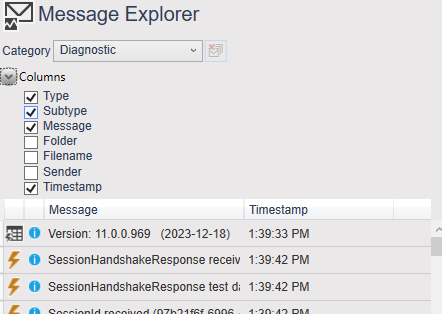
Messages displays the system message logs, and offers several column and sorting options.
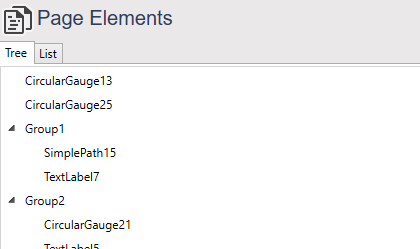
Page Elements lists all the elements on a page, in either tree or list view. This is helpful for managing pages with large numbers of controls.