- Pages that enable the user to select data point bindings in Run Mode.
- Templated pages that represent similar arrays of equipment or processes.
Dynamic Point Bindings allow you to create a single DataHub WebView page that shows different data depending on a control state, another script, user input or a start-up argument for the page.
Point bindings are made dynamic by starting the expression with "=" followed by a script expression that returns the name of a data point.
A point name expression is typically a single line in length. The result of a point name expression must be a string that contains the fully qualified point name, starting with the data domain and a colon. A point name expression is auto-executing, so references to dynamic global variables, data points and control properties will cause the point name to be reevaluated when the referenced value changes.
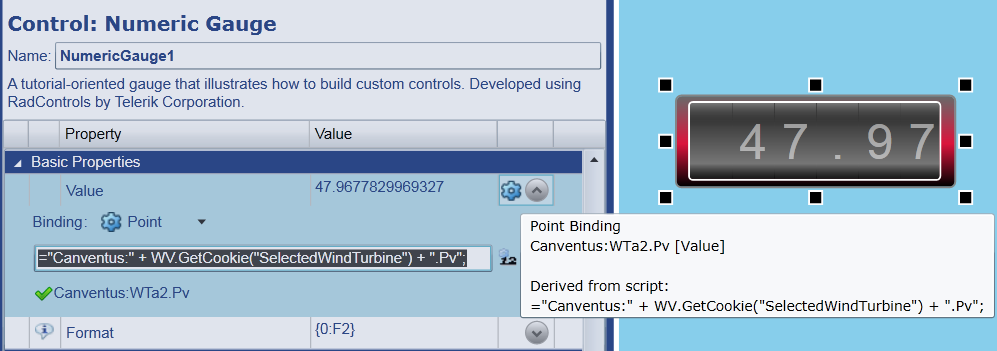
="Canventus:" + WV.GetCookie("SelectedWindTurbine") + ".Pv";
The script returns a point name by concatenating a string that represents a data domain ("Canventus:")
with the value of a script cookie, with the remaining portion of the point name (".Pv").
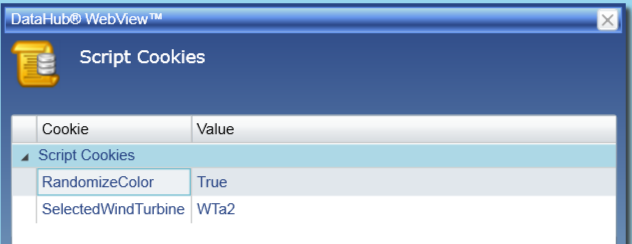
The current value of the cookie is "WTa2" so the numeric gauge gets bound to Canventus:WTa2.Pv.
Script cookies can be changed using the Script Cookies dialog, which can be displayed by selecting Tools | Script Cookies.
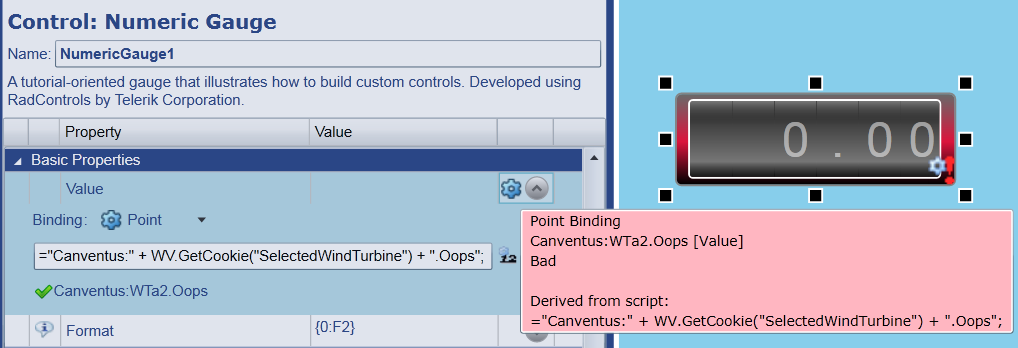
If the script expression does not return a recognized point name or if the point value has bad quality, the control will display a warning icon (depending on the control's BadDataAdornmentType property). In Design Mode, you can troubleshoot point binding problems by hovering over the binding type icon, as illustrated below.