
Persistence and Scope
Script cookies persist to Silverlight Isolated Storage. Script cookies can be used to store user-specific data on the local machine. Script cookies are not saved to the server, and are therefore not shared among other DataHub WebView sessions running on other machines. If you need to share data among DataHub WebView sessions and users, consider using DataHub data points.
Working with Script Cookies
To access script cookies, use WV.GetCookie and WV.SetCookie.
The WV object is globally accessible, so you can read and write script cookies from any script. For example, this code uses the value
of the script cookie 'SelectedWindTurbine' to build a data point name.
="Canventus:" + WV.GetCookie("SelectedWindTurbine") + ".Pv";
Script cookies can also be changed using the Script Cookies dialog, which can be displayed by selecting Tools | Script Cookies.
Clearing Isolated Storage
Assuming you have adequate permissions, you can clear isolated storage for the DataHub WebView application running on the local machine. Clearing isolated storage will delete all user options and script cookies for all users who use DataHub WebView on the local machine. To clear isolated storage, please consult See Also.
This example illustrates a page that displays information from an array of three wind turbines. The gauge, trend chart and other display elements reflect the currently selected turbine. The user can select a turbine in the 'Wind Turbine' combobox, or can choose to 'Automatically Cycle' through the list.
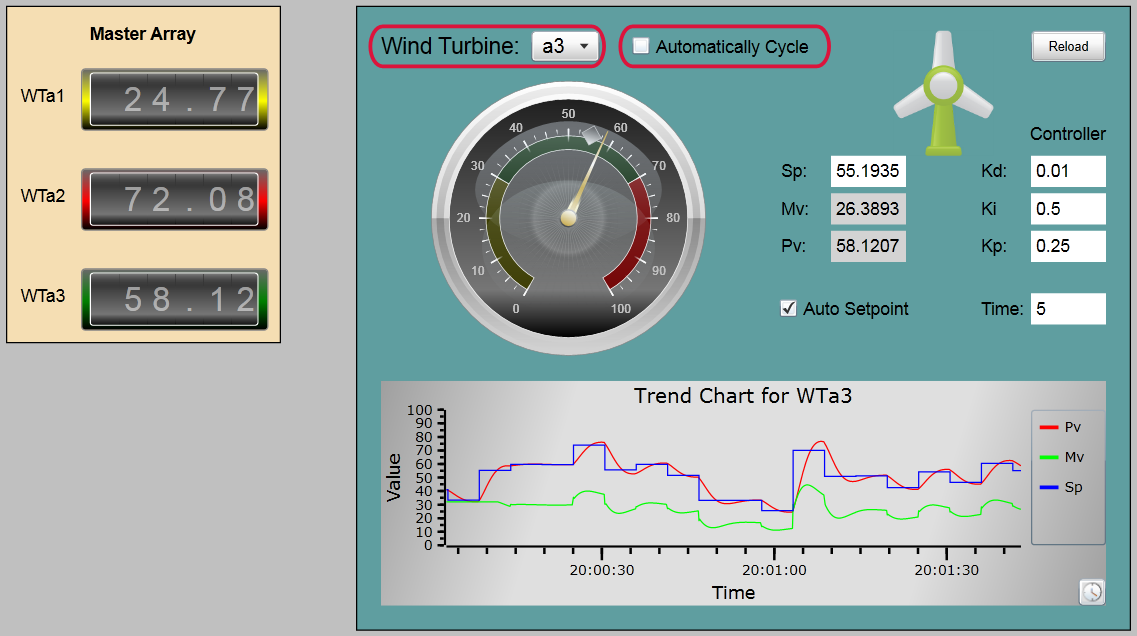
To persist the user's selections, the following script event handlers have been added.
Wind Turbine combobox ('wtSelector') OnDropDownClosed: Sets a cookie to represent the selected wind turbine.
WV.SetCookie("SelectedWindTurbine", GETP("@SelectedIndex"));
Automatically Cycle checkbox ('chkAutoCycle') OnChecked: Sets a cookie to represent auto-cycle is selected.
WV.SetCookie("AutoCycleSelectedWindTurbine", 1);
Automatically Cycle checkbox ('chkAutoCycle') OnUnchecked: Sets a cookie to represent auto-cycle is not selected.
WV.SetCookie("AutoCycleSelectedWindTurbine", 0);
OnPageLoadStarted: Declares a script function that applies the saved cookie values to the controls.
 function ApplyCookies()
 {
   var wt = WV.GetCookie("SelectedWindTurbine");
   var auto = WV.GetCookie("AutoCycleSelectedWindTurbine");

   if (wt != null)
     SETP("wtSelector@SelectedIndex", wt);

   if (auto != null)
     SETP("chkAutoCycle@Value", auto);
 }
OnPageLoadComplete: Calls the registered script function.
ApplyCookies();
Reload button ('btnReloadPage') OnClick: Reloads the current page.
WV.ExecuteCommand("OpenPage", Page.PageFullPath);
In Run Mode, whenever the user clicks the Automatically Cycle checkbox, or makes a selection from the Wind Turbine combobox, the script cookies are set and saved.
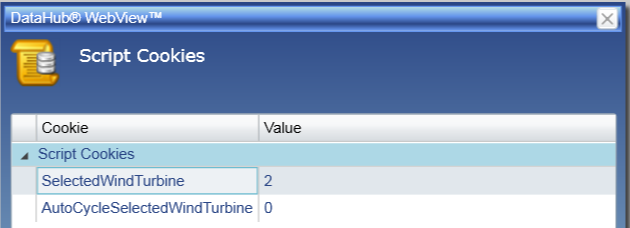
When the user clicks the Reload button, the page re-opens and the persisted cookie values are retrieved and applied. The script cookies persist even when the user closes and restarts DataHub WebView.