14.3. Selecting Audit Events
The Enable Audit Events group on the Audit tab provides two views for selecting which events to record.
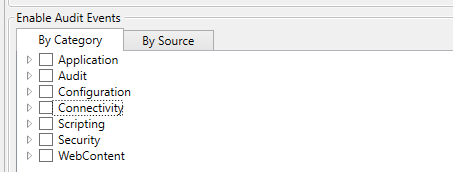
By Category
The By Category view organizes events by what they record. This is the recommended view for most configuration tasks. The following top-level categories are available:
- Application
Application lifecycle events including startup, shutdown, plugin activation and deactivation, and license changes.
- Audit
Internal audit subsystem events such as local storage thread start, stop, and record purge operations.
- Configuration
Configuration lifecycle events including configuration changes, change requests, and Git-tracked configuration file changes.
- Connectivity
Connection lifecycle events organized into incoming and outgoing sub-categories. Each component that manages connections registers its own events under this category.
- Scripting
Events related to script execution and scripting engine operations.
- Security
Security-related events organized into sub-categories: authentication, session lifecycle, user management, role management, permission set management, and security administration.
- WebContent
Web content management events including content manager lifecycle and user content operations such as file creation, modification, and deletion.
Expand each category to see its sub-categories and individual events. Check a category to enable all events within it, or expand and select individual events.
![[Tip]](images/tip_890317870.png) | |
When all events under a category are enabled, DataHub stores a category-level directive. Any new events added to that category in the future (by plugin updates or newly loaded components) are automatically enabled. This ensures comprehensive coverage without manual reconfiguration. |
By Source
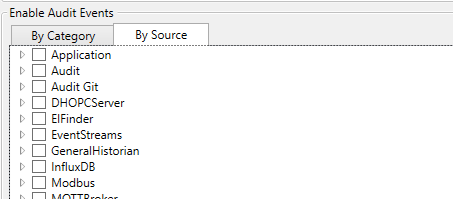
The By Source view organizes events by which component emits
them. Each plugin or subsystem that emits audit events registers itself as a source
and is responsible for its own event registrations. This view is useful when you
need to enable or disable all events from a specific component — for example,
to enable all events from Security or OPC UA
Client.