14.5. Using Local Storage
Enabling Local Storage
Navigate to the Local Storage tab.
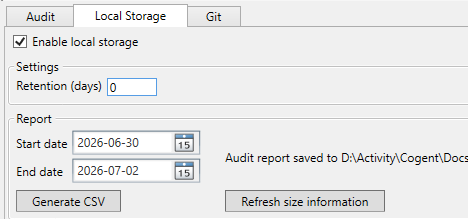
Check Enable local storage.
Set the Retention (days) value. Enter
0to retain records indefinitely, or enter a number of days after which old records are automatically purged. Purging occurs every 6 hours.Click .
The DataHub instance creates a SQLite database file
(Audit.sqlite) in the plugin's configuration directory
and begins writing audit events to it.
Generating Reports
To export audit records as a CSV file:
On the Local Storage tab, set the Start date and End date to define the date range.
Click .
Choose a location to save the CSV file.
To view database size information, click . The display updates with the current database file size and record count for the selected date range.