11.5. Assigning a Trigger
A trigger is an event that causes your query to be sent to the database. A trigger event can be either a point value change, a repeat timer, a time of day timer, or an "after" timer. You can assign a different trigger for each query, or an identical trigger to any number of queries. A query action can be configured to execute on every trigger event, or you can assign trigger conditions that are evaluated whenever a trigger occurs, to determine if the action should be executed.
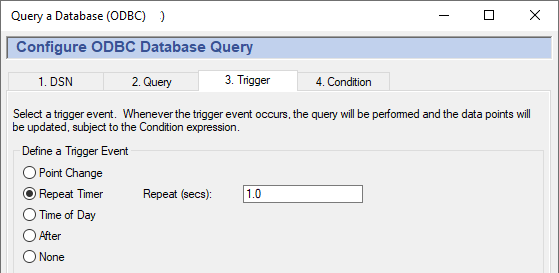
The four kinds of triggers are:
Point Change fires whenever a specified trigger point changes.
Type the name of the point into the Point Name box, or select the point using the data tree on the right, then click the button.
(Optional) Enter a value deadband if you want to filter out extraneous data. The number you enter will specify a high and low (plus or minus) range. Any value change falling within that range will not cause the trigger to fire. A positive or negative change greater than this value will activate the trigger and cause the row to be written.
![[Note]](images/note_1156523861.png)
To create a trigger that gets reset automatically, please refer to An Auto-Resetting Trigger in Section 11.6, “Setting Trigger Conditions”.
Repeat Timer fires cyclically, each time the specified number of seconds elapses.
Time of Day fires at the time you specify. You can enter:
A number, indicating a specific value. For example, a
0in the seconds field would cause the event only on the 0th second of the minute. A30would indicate only on the 30th second of the minute.A list of numbers, separated by commas. For example, entering
0,15,30,45in the minutes field would indicate that the event should fire on the hour and at 15, 30 and 45 minutes past the hour.A range of numbers, separated by a dash. For example, entering
8-18in the hours field would indicate that the event should fire every hour from 8 a.m. to 6 p.m.. Ranges can be mingled with lists, as in0,4,8-16,20.An asterisk (
*) indicates that the event should fire for every possible value of the field. For example, a*in the seconds field would cause the event to fire every second. A*in the hours field would cause the event to fire every hour.
To regularly log a record on specific days of the week, please refer to Section 11.6, “Setting Trigger Conditions”.
The ranges of the fields are:
Year: 1970-*Hour: 0-23Month: 1-12Minute: 0-59Day: 1-31Second: 0-59The year and month are entered differently here than for the Gamma
localtimefunction, as explained in Time Conditions.Examples:
These entries:
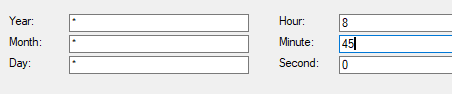
would trigger a query at 8:45 every day, every month, and every year.
These entries:

would trigger a query every hour on the 15th day of each month, every year.
These entries:

would trigger a query every second for 5 minutes, every two hours between 8 a.m. and 6 p.m.
After fires once, when the specified number of seconds elapses.
None configures no trigger.