Chapter 9. Using Redundancy
Redundancy in a process control system means that some or all of the system is duplicated, or redundant. The goal is to eliminate, as much as possible, any single point of failure. When a piece of equipment or a communication link goes down, a similar or identical component is ready to take over.
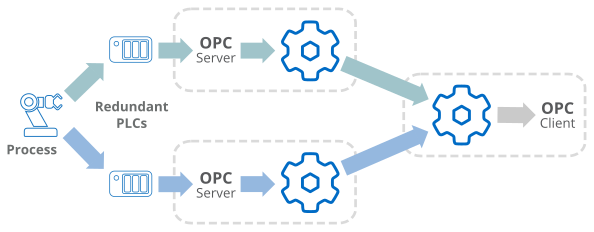
For data communications, redundancy means sending data from a single data source over two separate paths, and presenting it to a user as a single data set. The two paths may include redundant PLCs, redundant OPC servers, redundant networks, and so on. The data flow is typically from data source to data user.
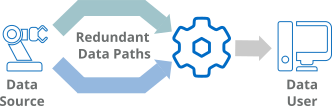
The DataHub Redundancy feature operates at the point where the two data paths meet. It monitors both data streams, and determines which of them should be used from that point onwards. The choice between data stream depends on Redundancy criteria that you configure. Data from the two incoming streams and the outgoing stream is maintained in three separate DataHub data domains.
![[Important]](images/important_2051192373.png) | |
Configuring the Redundancy feature is explained in the Redundancy section of the Properties window chapter of this book. This Using Redundancy chapter will help you get the most out of this DataHub feature. |
9.1. Typical Scenarios
Redundancy Scenario 1 - No redundancy
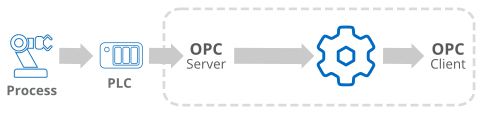
One process, one client, one computer
Single data path (PLC and OPC server)
Redundancy Scenario 2 - Redundancy with one computer
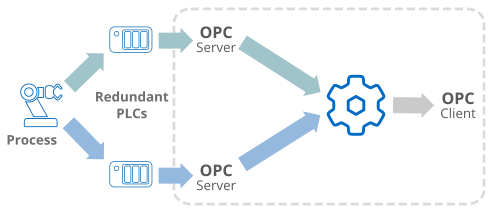
One process, one client, one computer
Redundant data paths: 2 PLCs and 2 OPC servers
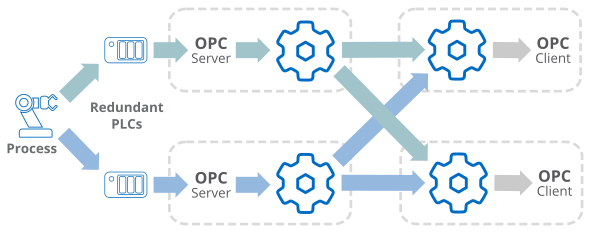
Redundancy Scenario 3 - Networked redundancy
Redundancy Scenario 4 - Networked, multiple client redundancy