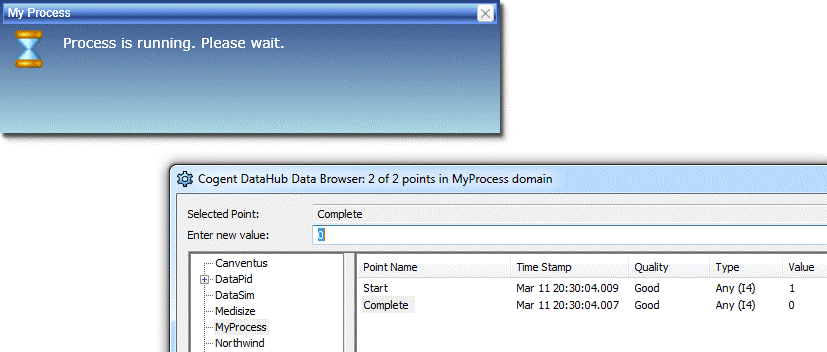
Displays a wait message dialog.
| Name | Description |
|---|---|
| WaitBox(object) | Displays a wait message dialog. |
| WaitBox(object, string) | Displays a wait message dialog. |
The user can not interact or dismiss the wait dialog. It remains on the screen until your script executes CloseWaitBox.
The wait dialog is intended to be used with long running scripts or server-side processes when you want to prohibit user interaction until some process completes.
This example illustrates how to trigger the start of a (long-running) server-side process and wait for it to complete.
Setting the 'MyProcess:Start" data point to 1 triggers the process. When the 'MyProcess:Complete' data point changes to 1,
the process is deemed complete.
 // Place a Simple Button on the page.
 // Place this script in the button's OnClick event.
 WV.WaitBox("Process is running. Please wait.", "My Process");
 SET("MyProcess:Complete", 0);
 SET("MyProcess:Start", 1);

 // Add a Script binding to the button's Is Enabled property, and add this script.
 var isComplete = VAL("MyProcess:Complete") > 0;
 if (isComplete)
 {
   SET("MyProcess:Start", 0);
   WV.CloseWaitBox();
 }

 var isRunning = VAL("MyProcess:Start") > 0;
 return !isRunning;

 // To start the process, go into Run Mode and click the button. The wait dialog is displayed and the button is disabled.
 // To end the process, use the DataHub Data Browser to manually set the MyProcess:Complete point to 1. The wait dialog is closed and the button is enabled.