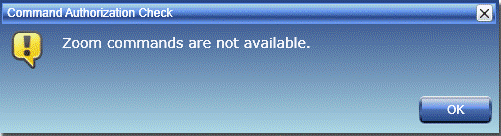
Displays an interactive message dialog.
| Name | Description |
|---|---|
| MsgBox(object) | Displays an interactive message dialog with the specified text. |
| MsgBox(object, string) | Displays an interactive message dialog with the specified text and title. |
| MsgBox(object, string, object) | Displays an interactive message dialog with the specified text, title and severity. |
The current implementation of MsgBox does not offer a choice of buttons because the MsgBox method does support a return value, i.e., there would be no way to determine which button the user clicks.
This example displays an information or warning message, depending on whether zoom commands are available.
Since the script first enters Run Mode and switches to Kiosk View, zoom commands are not available, so the warning message is displayed.
  WV.ExecuteCommand("EnterRunMode");
  WV.ExecuteCommand("ToggleKioskView", true);

  if (WV.IsCommandPermitted("ZoomBestFit"))
    WV.MsgBox("Zoom commands are available.",
      "Command Authorization Check", Severity.Information);
  else
    WV.MsgBox("Zoom commands are not available.",
      "Command Authorization Check", Severity.Warning);