4.7. Scripting Tips
Here are some ways to facilitate scripting.
4.7.1. Copying a complete tutorial
The code from DataHub tutorials can be copied directly from the text into the Script Editor. Here's how to make a new script from a complete tutorial.
Open the DataHub Properties window and select the
 option.
Click the button. This dialog will appear:
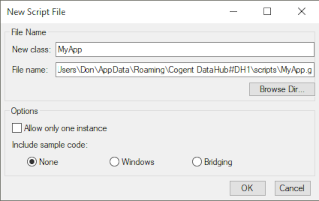
In the New class: field, enter a name of your choice.
Click the button to create the file. The Script Editor will open, displaying a script template.
Using the cursor or Ctrl-A, select all the text and delete it.
Copy a complete tutorial from the DataHub Windows Help manual or online documentation into the Script Editor.
Save and run the script using the blue arrow icon
 .
.