4.2. Hello World
This simple example demonstrates how to edit a new script by editing the
.constructor method.
Edit the Constructor
Create a new script whose main class is called '
HelloWorld'. Here's how.The body of a typical script is written as part of the
.constructormethod. Find the following lines to start editing:/* Write the 'main line' of the program here. */ method HelloWorld.constructor () { }In between the brackets of the
.constructormethod, enter the following:pri
Notice that a drop-down box appears:
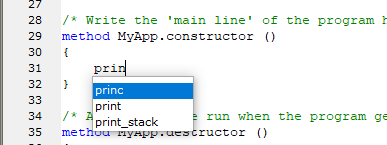
This box will appear any time you begin to write a function or variable name that is already available in the Gamma engine.
Continue writing:
princ(
The box now shows you the
princfunction syntax, in this case a symbolic expression (s_exp), commonly know as a symbol. Please refer to the Gamma manual for more information about function syntax and arguments.Continue editing the
princfunction until your.constructorfunction looks like this:/* Write the 'main line' of the program here. */ method HelloWorld.constructor () { princ("Hello world.\n"); }
Run the Script
Click the blue arrow icon  in the Script Editor toolbar to run the script, and then check
the results in the Script Log window:
in the Script Editor toolbar to run the script, and then check
the results in the Script Log window:
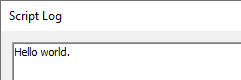
If you don't get a 'Hello world' string in the Script Log, see
Appendix 1, Basic Troubleshooting.
Evaluate a Selection
Here's a way to evaluate just a part of your code:
In the Script Editor, use the cursor to select just the text:
princ("Hello world.\n");From the menu, select .
You should see the string '
Hello world.' appear in the Script Log.
This feature of the Script Editor lets you run any part of a script without running the whole thing.