4.3. Accessing Data
A DataHub script has complete access to all the data in the DataHub instance. Every point in the DataHub instance is available in the Gamma engine as a global variable, with the syntax:
$domain_name:point_name
The dollar sign character ($) tells the Gamma engine that the
colon is part of the variable name. A colon in the Gamma language is normally a
syntactic element and can't be used in a variable name. However, the DataHub program
uses a colon (:) in point names to separate the domain name from
the rest of the point name. So we need to use the dollar sign. The dollar sign is
not part of the variable name.
![[Note]](images/note_1156523861.png) | |
For these examples, ensure that the DataSim program is running and connected to the DataHub instance. |
Access a Value Once
To start with, here's how to read a value one time.
Create a new script with a class named
AccessData, selecting . Here's how.Scroll down to the
.constructormethod, and enter the following:method AccessData.constructor () { princ("The sine is: ", $DataSim:Sine, "\n"); }Make sure the DataSim program is running, and that the Script Log is open so you'll be able to see the script output.
Click the blue arrow icon
 in the Script Editor toolbar. You should see a value
appear in the Script Log window, like this:
in the Script Editor toolbar. You should see a value
appear in the Script Log window, like this: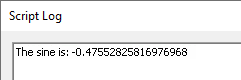
Click the blue arrow icon several more times. Each time, a new value should appear in the Script Log. The values will differ because the value for the sine wave in DataSim is constantly changing.
Access Values Continuously
Getting a single value from the DataHub instance is fine, but we can do much better. Let's print each new value from a point every time it changes.
First you should move the
princstatement out of the.constructor. This may seem trivial in this example, but it is a good habit to get into. Move theprincstatement to theAccessData.sample method, and edit the method name andprincstatement to look like this:method AccessData.print_point (pt) { princ("The sine is: ", pt, "\n"); }Edit the
.constructormethod like this:method AccessData.constructor () { .OnChange(#$DataSim:Sine, `(@self).print_point($DataSim:Sine)); }The
OnChangemethod is inherited from the parent class,Application. This method is a wrapper for theon_changefunction, which tells the Gamma engine to evaluate an expression when a given symbol changes value. In this case, the symbol is$DataSim:Sineand the expression is ourprint_pointfunction. The first expression is protected from evaluation by the#quote operator.The second expression is also quoted so that it doesn't run until the point actually changes. However, the
selfthat is usually understood must be explicitly written and evaluated so that the Gamma engine knows what the.print_pointmethod applies to. Therefore, we use the`and@quote operators.Click the blue arrow icon
in the Script Editor toolbar. A new value gets written twice a second. To see it really fly, bring up the DataSim window, click the button, and change the Update Frequency to 200 (don't forget to click ). To make it stop, click DataSim's button.
But what if you can't stop the data flow? How do you get the
princfunction to stop?
Stop Accessing Values
Often you will want a script's change functions to stop when the class instance is
destroyed. Conveniently, the Application
class has a destructor that runs any time a child class gets destroyed, and which
removes all OnChange functions. One way to destroy the
instance of class is with a timer.
| |
The timer is used here for demonstration purposes. Most Windows programs get destroyed by clicking a button or some other means. |
Go to
.constructormethod and adding the following code:after(3, `destroy(@self));
This uses the Gamma
aftertimer function, which in this case will activate 3 seconds after the instance is constructed and cause the instance to destroy itself. Again, to prevent thedestroyfunction from being evaluated and destroying our instance prematurely, we have to quote it. And again, we use the`and@quote operators to evaluate theselfargument. After 3 seconds, thedestroyfunction will be evaluated, and the instance gets destroyed.Your two methods should now look like this:
method AccessData.print_point (pt) { princ("The sine is: ", pt, "\n"); } method AccessData.constructor () { .OnChange(#$DataSim:Sine, `(@self).print_point($DataSim:Sine)); after(3, `destroy(@self)); }Run the script. You should see output in the Script Log for 3 seconds, then nothing.
Verify Results
To verify that the instance of the class has been destroyed, type
instance_p(_AccessData_Singleton)in the text entry field at the bottom of the Script Log and press Enter. The output should look like this:--> instance_p(_AccessData_Singleton); nil
The
instance_pfunction is a Gamma predicate that checks to see ifaccessdatais an instance. The Gamma engine returnsnil, indicating that it is not an instance.Since
accessdatawas an instance and is no more, it is probably a destroyed instance. To check, typedestroyed_p(_AccessData_Singleton);and press Enter. The output should look like this:--> destroyed_p(_AccessData_Singleton); t
The Gamma engine returns
t, indicating that it is a destroyed instance.