2.2. Menu Options
These two menus contain the following options.
Connection
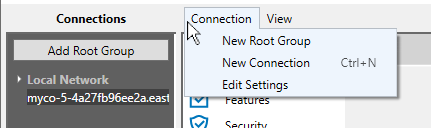
Lets you add a new root group, which you can use to help organize a large number of connections. This is the same as clicking the button.
Lets you add a new connection. For the Cogent DataHub program, please see Configuring a Local DataHub Instance for more information on making a connection. For the Cogent DataHub service, when you use the Web Application Manager to launch the Remote Config application, the connection is configured automatically, so this option is not usually necessary.
Opens the Application Settings window, where you can set the HTTP timeout. The default setting of 100 seconds (100,000 ms) is typically sufficient, but you can change it here if necessary.
View

Hides or displays the Connections panel on the left-hand side.
Hides or displays the Message panel at the bottom.
Each of these three menu options deletes the corresponding saved state for the Remote Config user interface. The next time a window or dialog is opened, that state will revert to its defaults.
Resets all window and dialog screen positions to the defaults when reopened. This is useful if you think the saved window positions are causing problems, for example if a window is being drawn off-screen.
Restores the order of columns in lists. For any lists in the main window, such as the lists of OPC client connections, you will need to restart the Remote Config program to see the result.
Some dialogs allow you to reposition the splitters between different dialog panes. This option restores the default sizing.
Status Icon
![[Note]](images/note_1156523861.png) | |
This feature is currently only available for the Cogent DataHub service. |
This icon shows the communication status with the DataHub instance. Remote Config connects to the DataHub data engine for data communications, while non-data related information comes via HTTP, from the DataHub Web Server.

No color: Both HTTP and data communications are connected.
Yellow: HTTP communications are disconnected, while data communications are connected.
Red Both HTTP and data communications are disconnected.