3.10. Web Server

|
The Web Server option lets you configure the DataHub program to run as a lightweight http server capable of serving HTML documents, Java applets, and many kinds of binary files. It features password-protected access and server-side scripting, and supports DataHub WebView. |
![[Note]](images/note_1156523861.png) | |
For information about using the Web Server, please refer to Chapter 11, Using the Web Server. |
Web Server
The web server can be turned on and off while the DataHub instance is running.

Ensure the Act as web server box is checked to enable the web server. Uncheck the box to disable it.
Base Configuration

- Port
The number of the port used to make TCP connections to the web server. The DataHub Web Server is preconfigured to run on port number 80, but you might need to change that setting.
![[Important]](images/important_2051192373.png)
Windows allows multiple users on a single TCP port, and never refuses a connection. However, this can cause irregular behavior. It is essential that the DataHub Web Server be the exclusive user of a port. Please refer to step 4 in Section 11.2, “Configuring the DataHub Web Server” for more details.
- Use secure sockets (SSL)
Checking this box will cause the web server to run in secure mode.
- Allow directory listing
Checking this box allows users to browse the directory on your server.
- Document root directory
The root directory for your documents. The recycle button resets the entry to the default setting.
Options
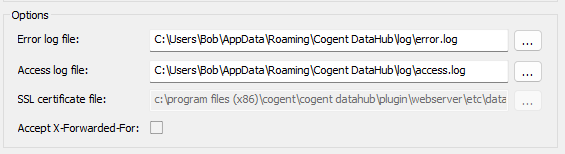
- Error log file:
The path and name of the file where errors are logged.
- Access log file:
The path and name of the file where access attempts, successes, and failures are logged.
- SSL certificate file:
The path and name of the certificate file used for secure sockets (SSL). Please see SSL Certificates for more information about SSL certificates in the DataHub program.
- Accept X-Forwarded-For:
Check this box to use X-Forwarded-For (XFF) headers in proxy requests, which will apply permissions based on the original client's address. Otherwise, permissions will be associated with a proxy's address, and will apply to any connection being made through the proxy. This option applies to both web requests and tunnels being made via a WebSocket.
A malicious client could add an XFF header to a web request and thereby masquerade as a different IP address. For example, the client could know the IP address of the DataHub machine, and add that IP address as an XFF header. That would cause the DataHub instance to believe that the connection is coming from the local host, which could then give the malicious client more permissions than would otherwise be allowed. This connection would not need to be via a proxy. The malicious client could make a direct connection and still add the X-Forwarded-For header.
Additionally, HTTP requests are allowed to repeat headers. When a proxy receives an incoming request, it can add its own XFF header to the message. If a malicious client sends an XFF header, then the proxy will add a second one. DataHub software will take the last instance of any header as the only applicable one, so if the proxy adds its XFF header to the end of the message's header block then the DataHub instance will ignore the malicious header and only process the proxy's header.
Consequently, you should not enable this option unless both of these two conditions apply:
You know all non-localhost connections to this DataHub instance will be via proxy.
Each proxy is configured to strip incoming XFF headers, or is guaranteed to add its own X-Forward-For header to the end of the header block in all requests.
WebView users
If there is any public way to connect to the DataHub instance without a proxy, then XFF must be disabled. If there is also a way to connect through a proxy then that proxy must not be accessible by untrusted clients.
If the only public way to connect to the DataHub instance is through a proxy, then XFF must be enabled.
If there is a public way to connect to the DataHub instance without a proxy, and also a public way to connect to it through a proxy, then neither setting for XFF is secure.
Also: Attacks require the attacker to acquire the victim's session ID. This is substantially harder if the connection is over SSL, so long as it uses a valid certificate. We make the session ID visible in WebView, so in theory an attacker could social engineer the attack by asking the user to provide it.
Explanation: WebView creates and authenticates a session over HTTP, then clones it so the data connection also has a separate authenticated session that is related to the first one. We do this because we cannot necessarily re-authenticate if the TOTP code has expired. It means that anybody connecting from the HTTP session's IP address who has the session ID can open a socket and attempt to clone the session to acquire the session's credentials. The session ID is not a secret.
If a proxy is being used, and XFF is ignored, then all connections appear to come from the proxy's address. In that case, somebody who has the session ID can issue commands through the proxy and appear to be the original user.
If a proxy is not being used, and XFF is processed, then somebody who has the session ID could add XFF to the headers and masquerade as the original user.
There is no way for the DataHub instance to tell if a proxy is being used other than from the headers, which can always be spoofed if there is no proxy in use.