3.25. Remote Config

|
The DataHub installation includes the Remote Config program, a tool that lets you connect to the DataHub program while it is running as a Windows service, or when it is running on a different computer on the network. The Remote Config option here in the Properties window lets you specify what configuration options the Remote Config program will have access to. |
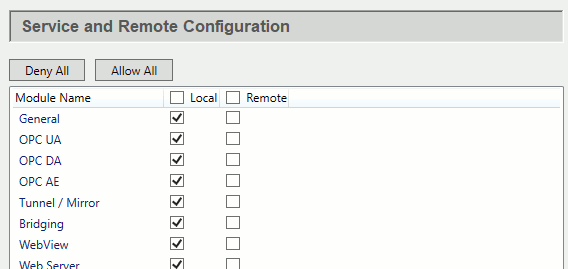
You must configure the DataHub program to allow remote configuration for any features that you wish to be able to remotely configure. For example, you may want to remotely configure Tunnel connections, but not allow scripts to be configured except from the local computer.
Check the boxes of the features you want to be configurable. Checking a box in the Local column allows connections only from the Remote Config program running on the same machine, whereas boxes in the Remote column allow connections from the Remote Config program running on a remote machine. If you uncheck Local and check Remote, then a user on the local machine will not be able to configure that feature. The and buttons uncheck or check all the boxes.
For more information on using the Remote Config program, please refer to the Remote Config section.