3.15.2. Apache Kafka
Apache Kafka provides distributed, fault-tolerant, and scalable event streaming capabilities, often used for real-time data integration, event-driven architectures, and building data pipelines.
Connection Settings
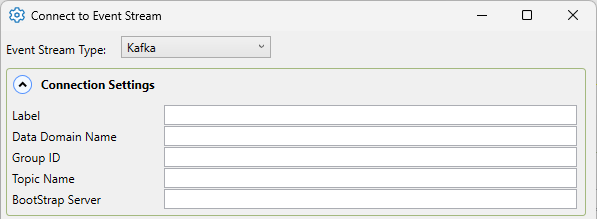
- Label
A unique text string used to identify this connection. This label is used to identify the connection when configuring store and forward, and to create the database name or retention policy in some historians. The label can contain only letters, numbers and the underscore (
_) character.- Data Domain Name
A unique text string specifying a DataHub data domain. All events that will be read from the Kafka topic will be stored within this domain.
- Group ID
Assigns the consumer to a specific group. If multiple consumers share the same Group ID reading from the same topic, they will share the load of reading from it.
- Topic Name
The name of the topic created when setting up the Apache Kafka cluster. This topic contains all the points that are being read. If using Azure Event Hubs for Kafka, this name will be the Event Hub name.
- Bootstrap Server
A comma-separated list of host and port pairs that are the addresses of the Kafka brokers in a “bootstrap” Kafka cluster. If using a local Kafka cluster, use:
localhost:9092.![[Note]](images/note_1156523861.png)
If using Azure Event Hubs for Kafka, the topic name will be:
Namespace.servicebus.windows.net:9093Namespace
Security
The authentication mechanism used to connect to Kafka.

- Security Protocol
Select one of the following that the Kafka Cluster is set to accept: Plaintext, Ssl, SslPlaintext, SaslSsl. If using Azure Event Hubs for Kafka [link], use SaslSsl.
- SASL Mechanism
If SaslSsl is selected as the Security Protocol, select one of the following Sasl mechanisms specified by the Kafka Cluster to authenticate your Kafka connection: Gssapi, Plain, ScramSha256, ScramSha512, OAuthBearer.
SASL Credentials

- SASL Username
The SASL username. For a connection to an Azure Event Hub, the username will be:
$ConnectionString.- SASL Password
The corresponding password. For a connection to an Azure Event Hub, the password will be the primary connection string of the Event Hub namespace.
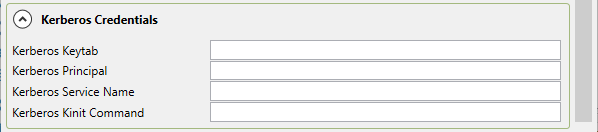
Kerberos Credentials
Credentials for the Kafka Cluster if it uses Kerberos Authentication.
SSL Credentials
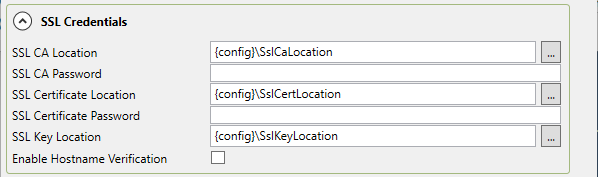
Credentials for the Kafka Cluster if it uses SSL Authentication.
- SSL CA Location
The location of the SSL CA certificate. Use the button with the three dots
 to open the file selector.
- SSL CA Password
The password for the SSL CA certificate
- SSL Certificate Location
The location of the SSL certificate. Use the button with the three dots
to open the file selector.- SSL Certificate Password
The password for the SSL certificate
- SSL Key Location
The location of the SSL key. Use the button with the three dots
to open the file selector.- Enable Hostname Verification
Host name verification checks that the broker host name matches the name in the broker certificate.
Azure Event Hubs for Kafka

- Enable Event Hubs for Kafka
Checking this box enables writes to an Event Hub, using Apache Kafka.
Please see Common Settings for the rest of the settings.