3.15. Event Streams

|
The Event Streams option lets you connect a DataHub instance to event streams from various providers, currently Apache Kafka and Azure Event Hubs.
|
![[Note]](images/note_1156523861.png)
Event stream services support real-time ingestion, distribution, and processing of events or messages from various sources to multiple consumers, facilitating data integration, event-driven architecture, and real-time analytics.
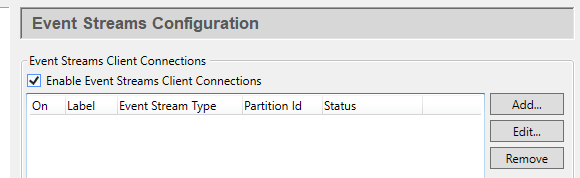
Check the box for event streams functionality. Since a DataHub instance can connect to more than one event stream, you need to specify information about each one. Once a stream is listed, you can activate or deactivate the connection using its On check box.
To add an event stream, press the button to open the Connect to Event Stream window described below. To edit a stream, double-click it or select it and press the button to open that window. To remove a stream, highlight it and click the button.
3.15.1. Azure Event Hubs
Azure Event Hubs is a cloud-based event streaming service provided by Microsoft Azure, designed for high-throughput and real-time data streaming. As part of the Azure messaging services, it can handle large volumes of events needed for IoT data ingestion.
Connection Settings
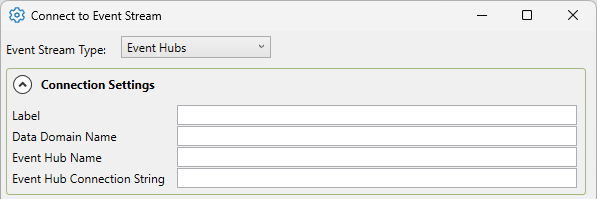
- Label
A unique text string used to identify this connection. This label is used to identify the connection when configuring store and forward, and to create the database name or retention policy in some historians. The label can contain only letters, numbers and the underscore (
_) character.- Data Domain Name
A unique text string specifying a DataHub data domain. All events that will be read from the Event Hub will be stored within this domain.
- Event Hub Name
The name of the Event Hub that will be read from.
- Event Hub Connection String
The connection string used to connect to and authenticate the Event Hub connection. This can be found in the Event Hub's Namespace page, under Shared Access Policies.
Please see Common Settings for the rest of the settings.