14.7. Locking the Configuration
Manual Locking
On the Audit tab, check Lock configuration in the Locking group.
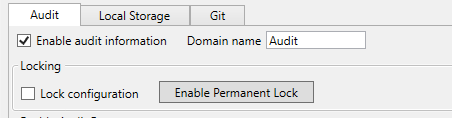
Click .
The configuration is now locked. It can be expanded (new events, data points, and features added) but not narrowed. To unlock, clear the Lock configuration checkbox and apply. Manual locking is reversible as long as a permanent lock has not been enabled.
Enabling Permanent Lock
On the Audit tab, click .
![[Warning]](images/warning_2116355759.png)
Enabling permanent lock is a permanent, irreversible action. Once enabled, the configuration is automatically locked whenever auditing is enabled, and neither permanent lock nor configuration locking can be disabled through the user interface. The only way to reverse this is to manually edit the XML configuration file on the server filesystem.
Confirm the action when prompted.