15.3. Custom Data Permissions
To demonstrate how to configure custom data permissions, we will use the DataPid program.
Connecting via the internal TCP user
To provide easy access for local TCP connections, there is an internal user,
TCP, that allows connectivity and full data access on the
local machine.
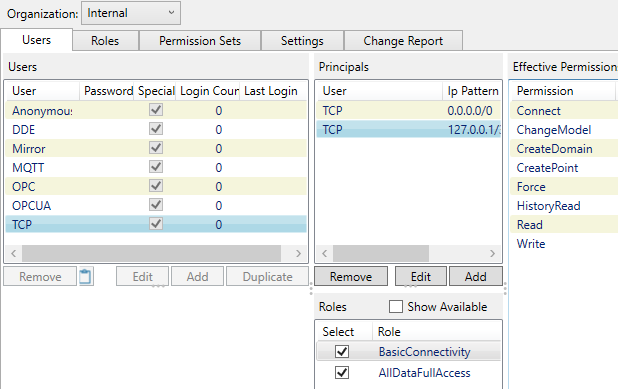
Since DataPid connects via TCP it can connect and exchange data as the TCP user. You can verify this as follows.
Start the DataHub program and DataPid.
You should see the following:
DataPid status: Connected DataHub Event Log: shows incoming TCP connection established DataHub Connection Viewer: TCP Incoming connection established with username TCP DataHub Data Browser: DataPid data is updating.
Custom user with permissions limited by role
Now we will use DataPid to demonstrate how to restrict access to the DataHub instance by creating a custom user with limited permissions.
In the Local organization, create a BuiltIn user called
DataPidSourcewith a passwordtest.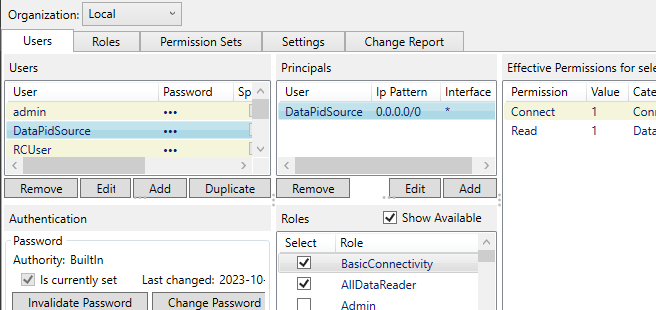
Disable the role
RequireTotpAuthenticationand enable the roleAllDataReader, leaving just the two rolesBasicConnectivityandAllDataReader.Apply the changes.
Disconnect DataPid, and reconnect using the
DataPidSourceusername andtestpassword.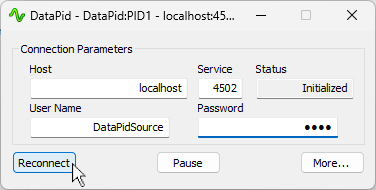
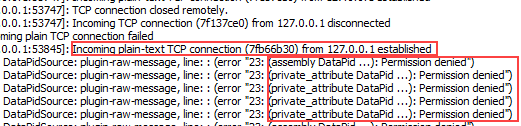
In the Event Log, you will see that the connection was established but permissions to create assemblies, sub-assemblies, and attributes (like data points), were denied.
Expanding permissions by changing roles
Now we will add a special role (DataPidAndDataSimFullAccess)
designed to enable full permissions on the DataPid and DataSim domains. This special
pre-defined role can be used an example for creating your own custom data
permissions for specific data domains or data domain patterns.
Edit the DataPidSource user by disabling the
AllDataReaderrole and enabling theDataPidAndDataSimFullAccessrole.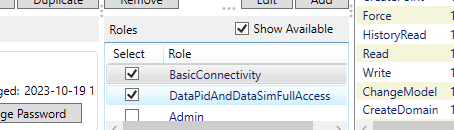
Apply the changes.
Disconnect and reconnect DataPid, still using the
DataPidSourceusername andtestpassword.
You should now see no error messages in the Event Log, and the data for DataPid should be updating in the Data Browser.
Restricting permissions by principal
It is also possible to restrict access by principal, such as the user's URL or data protocol. Here we will create a separate principal to restrict all DataPid updates except through TCP connections from localhost.
Ensure that the DataPidSource user is still selected, then disable the
DataPidAndDataSimFullAccessrole and enable theAllDataReaderrole.
Apply the changes, then disconnect and reconnect DataPid, using the
DataPidSourceusername andtestpassword.You will now see error messages in the Event Log, and the DataPid data will stop updating in the Data Browser. All updates to DataPid data are now restricted.
Back in Security configuration, go to the Principals pane for DataPidSource and click the button to add a new principal.

Enter
127.0.0.1/32for the IP address, and selectTCPfor the interface. Then click .For this new principal, enable the
BasicConnectivityandDataPidAndDataSimFullAccessroles.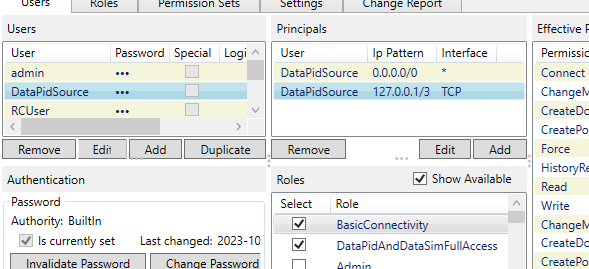
Notice that the
DataPidAndDataSimFullAccessroles provides effective permissions for the DataPid and DataSim domains.Apply the changes, then disconnect and reconnect DataPid, using the
DataPidSourceusername andtestpassword.
You should now see no error messages in the Event Log, and the data for DataPid updating in the Data Browser. The DataPidSource user can still connect to this DataHub instance from anywhere, but is now unable to update DataPid data except when connected from localhost.