3.8. Redundancy

|
The Redundancy option lets you configure redundant connections to the DataHub program. Please see Using Redundancy for more information on how this feature is used. |
The purpose of redundancy is to collect data from two data sources and present to the client program a single output data set. The DataHub program will determine which source will be presented to the client program, and switch between the two sources without affecting the client. The client will only read data from the output data set.
The two input and one output data sets are maintained as separate data domains in the DataHub program. The sources do not need to be the same protocol, so redundancy can be applied to two sources, for example where one is a direct OPC connection and the other is a tunnel.
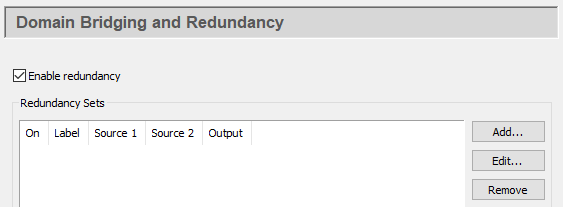
Check the box to activate this feature. Redundant connections are created and stored in sets. You can create multiple redundant sets, and activate or deactivate each set using its corresponding On check box in the list. To edit a redundancy set, double-click it here, or select it and press the button to open the Configure Redundancy window (see below). To remove a set, highlight it and click the button.
To create a redundancy set, press the button, which opens the Configure Redundancy window:

Data Domains
- Label:
A name used by the DataHub instance to identify the redundancy set. There should be no spaces in the label. It doesn't matter what label is chosen, but it should be unique to other labels.
- Source Domain 1:
The DataHub data domain for the first data source. If this is the preferred source, check the button.
![[Note]](images/note_1156523861.png)
If a preferred data source has been specified then the DataHub instance will use that source whenever possible, even if the other source is also available. This is useful if the two data sources have different characteristics. For example, the preferred source may offer a higher bandwidth than the other source. If neither data source is selected as preferred, the DataHub instance will maintain whichever data source is currently being used until it meets any invalid criteria (see below).
- Source Domain 2:
The DataHub data domain for the second data source. If this is the preferred source, check the button.
- Output Domain:
A name for a DataHub data domain which will be the output of the redundant connection, to which the client will connect. If the output domain does not exist, the DataHub instance will create it.
Input Domain is Invalid When
Entries in this section determine when the DataHub instance should switch from one redundant data source to the other.

- Data quality is:
Gives you the option of switching data sources based on a change in data quality for the point(s) you have selected (below). You can set the criteria of equal to or not equal to a list of available qualities, such as:
Bad EGU Exceeded Last Usable Sensor Calibration Comm Failure Good Local Override Sensor Failure Config Error Initializing Not Connected Sub Normal Device Failure Last Known Out of Service Uncertain Generally speaking, all of the above qualities are considered not good except for Good and Local Override. To ensure that you are getting good quality data from your OPC server, you can switch when Data quality is not equal to Good.
- Data value is:
Gives you the option of switching data sources based on a change in the value of the data point(s) you have selected (below).
- For point(s)
Allows you to select which points you want to monitor for quality or value (see above).
- For any point in the domain
Lets you monitor all points in the domain and switch when any one of them meets the criteria.
- For this point
Lets you specify an individual point name. The point name can be applied to a single point, or to a group of points whose names match the pattern.
| |
For more information please see Configure the Switch in the Using Redundancy chapter. |
Data Flow Detection
For data that changes regularly, Data Flow Detection lets you switch data sources whenever a gap in the data flow is detected. This option will watch for any change in any data point from an input domain. If no point in the input domain changes within the specified time, the entire input domain is assumed to be invalid. A subsequent data change must pass the validity checks above for the input to be considered valid.

- Switch sources if data stops for:
The number of seconds that the data flow from the domain must stop before the DataHub instance will switch to the redundant data domain.
Options

- Never switch. Always use the first source.
If you never switch, you never use a second source domain. Thus, this allows you to effectively create a copy of a domain, by copying Source Domain 1 into the Output Domain. To have the output domain function as a read-only copy of the source domain, select the Ignore values written to the output domain. option, as explained below.
- Do not refresh the output domain when switching.
Keeps the existing data in the output domain during a switch, and only updates with values from the new domain when a change occurs. Choosing this option may cause a mismatch between input and output domains for an indeterminate length of time.
Normally during a switchover the DataHub instance copies all values from the new source domain into the output domain. This copying activity might cause delays in updating the output domain for extremely large numbers of points. If that is your situation, and you know that your two servers are synchronized in all meaningful ways, you may wish to select this option. However, you need to keep in mind that values in the input and output domains may not match for an undetermined period of time.
- Never copy the data model to the output domain.
Preserves the data model of the output domain, or if there is no data model, flattens the data model from the input domain. In either case, the data point names are maintained. This can be helpful if targeting a system with limited system resources, such as an embedded system, or if you have an existing data model on the output domain and do not want it overridden by the data model on the input domains.
- Always copy the data model when switching.
Normally the output domain tracks changes in the data model, and when a switch occurs, if the data model has changed, it gets rewritten. This option forces the output domain to copy the data model, whether it has changed or not.
- Ignore values written to the output domain.
Normally, data written to the output domain propagates back to the input domains. This option prevents that from happening. Data written to the output domain will not be written to the input domain. Used with Never switch. Always use the first source. (above), this will make the output domain function as a read-only copy of the input domain.
- Do not write backward from output to read-only inputs.
This option is similar to Ignore values written to the output domain. (above), but prevents writes to points in the input domain only for those points marked as read-only. Data written to writable points in the output domain will be written to the input domain.
- Create data points showing input statistics
Used for debugging, this option creates extra points in the root of the output domain that indicate how many points are considered valid, invalid and uninitialized for each input domain.
The radio buttons under Treat uninitialized points as: let you choose whether a point in an input domain that has never been assigned a value (
BADquality,0timestamp, and0value) should be treated as:: The validity rules apply normally to it.
: The domain will never be used as an input until all data points have a value assigned to them.
: Any uninitialized points are ignored when determining whether the input domain is valid.
Status and Control Data Points (blank for disabled)
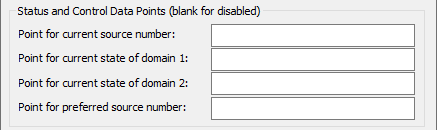
- Point for current source number:
The name of a DataHub point that will indicate which source is in use.
- Point for current state of domain 1:
The name of a DataHub point that will indicate the state of Domain 1.
- Point for current state of domain 2:
The name of a DataHub point that will indicate the state of Domain 2.
- Point for preferred source number:
The name of a DataHub point that will indicate which data source is your preferred source.
Click the button to submit your entries.
| |
For more information please see Troubleshooting in the Using Redundancy chapter. |