3.5. OPC A&E

|
The OPC A&E option lets you configure the DataHub program to act as an OPC A&E client, an OPC A&E server, or both simultaneously. To also configure the DataHub program as a source for alarms and events, please see Notifications. |
OPC A&E Client
The DataHub program can act as a client to one or more OPC A&E servers.

Check the box for OPC A&E client functionality. Since a DataHub instance can be a client to more than one OPC A&E server, you need to specify server information for each OPC A&E client connection. Once you have a server listed, you can activate or deactivate the connection using its On check box.
To add a server, press the button to open the Configure OPC A&E Server window described below. To edit a server, double-click it or select it and press the button to open that window. To remove a server, highlight it and click the button.
Pressing the button causes the DataHub instance to disconnect from the A&E servers and then re-establish the connection and re-query the alarm and event information from each of them, just like a new connection
The Configure A&E Server Window
To define or redefine an OPC A&E server connection, click the or button to open the Define OPC A&E Server Window:
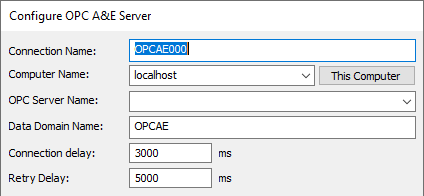
- Connection Name
A name used by the DataHub instance to identify the connection. There should be no spaces in the name. It doesn't matter what name is chosen, but it should be unique to other connection names.
- Computer Name
The name or IP address of the computer running the OPC A&E server you want to connect to. Select it from the drop-down list, or type it in.
- OPC Server Name
The name of the OPC A&E server that you are connecting to, selected from the list of available servers.
- Data Domain Name
The name of the DataHub domain in which the data points are received.
- Connection Delay
The number of milliseconds to delay the initial connection.
- Retry Delay
The number of milliseconds to wait before retrying a failed connection.
Options
You have several additional options:
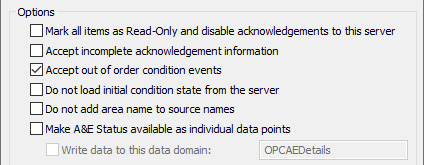
- Mark all items as Read-Only and disable acknowledgements to this server
This option will protect items on the DataHub instance from being changed by the client.
- Accept incomplete acknowledgement information
This allows connections to OPC A&E clients which are not configured for acknowledgements or that don't support this part of the OPC A&E specification.
- Accept out of order condition events
In OPC A&E the time stamp of an event should always be newer than the time stamp of the previous event for any condition. If, perhaps due to differing clock times on connected DataHub machines, you get errors indicating that events have arrived with out-of-order time stamps, then you can select this option to eliminate the warnings and accept the events.
- Do not load initial condition state from the server
When the DataHub instance connects to an A&E server it queries the server for the current state of all alarm conditions. Some servers report all conditions, whether they are active or not. Other servers only report the state of active conditions. Other servers do not report their initial state at all, and simply let the client learn about condition states as they change.
Selecting this option tells the DataHub instance to wait for an event before identifying conditions (and sources). That means that it won't call
GetQualifiedSourceName, and therefore will always present the source as seen inszSource. It also means that an A&E client will not be able to browse the complete condition tree from the DataHub instance, as it will start with no condition information and will only discover it as events arrive.- Do not add area name to source names
When constructing a source name from the initial condition state, the DataHub instance builds the source name by appending the source's area path followed by the unqualified source name from the server. This option disables this behaviour and uses only the unqualified name as the source name.
If you are using an A&E server that provides only a partial list of conditions when reading the initial condition state then this allows you to adjust for the behaviour of the server when discovering new conditions as events occur. Specifically, some servers provide an unqualified source name when requesting the initial condition state, but a qualified source name in subsequent events. This option allows you to produce source names that are consistent regardless of whether the source was determined during initialization or discovered later.
- Make A&E Status available as individual data points
This option gives you a way to maintain and access the values of A&E status variables in DataHub data points.
Filters
There are several options for filtering alarms and events:

- Filter by event type
There are three options available:
events are not related to an alarm, and cannot be tracked.
events originate outside the process being monitored, for example, an operator intervention.
events indicate that an alarm has been triggered. These events can be activated or deactivated, and they have an acknowledgement mechanism.
- Filter by severity
Severity, or priority, indicates the urgency of a condition for an alarm. A low value, such as
1, corresponds to a low urgency event, for example an informational message. A high value, such as1000represents an extreme emergency condition.- Filter by category:
This filter lets you select alarms or events according to the type of event, or event category.
- Filter by area:
This filter lets you select alarms or events based on the area, which is typically a location in a plant, or a specific machine.
- Filter by source:
This filter lets you select alarms or events based on the specific OPC A&E tag for the point.
OPC A&E Server
The DataHub program can act as an OPC A&E server to any number of OPC A&E clients. To configure it to act as a source for generating alarms and events, please see Notifications. If your DataHub instance is connecting to an external A&E server as an A&E client (see above), then this A&E server configuration will allow you to pass along A&E values. This is useful for:
Tunnelling OPC A&E data.
Converting OPC A&E data to OPC DA data.
Allowing OPC DA clients to interact with and display data from OPC A&E servers.

Check the box to have the DataHub instance function as an OPC A&E server, and choose a data domain. There are four optional settings:
- Accept incomplete acknowledgement information
Allows for the receipt of incomplete acknowledgements.
- Send a shutdown to clients when event configuration changes
This option may allow a client to reload events after they have been modified, and/or add new events.
- Automatically refresh conditions when a client connects
Causes the DataHub instance to re-transmit current condition information to all A&E clients whenever any client connects. This should only be used when a client requires current condition information but does not request current condition information during its initialization. Normally this should not be necessary.
- Do not add area name to source names
Tells the DataHub instance to use the source name without qualifying it with the area path. You should not normally need this option. By default the DataHub instance constructs fully qualified source names by prepending the area path to the source name. In most cases this is useful, as it guarantees uniqueness among condition sources, which is required for correct operation. For cases where the unqualified source name is unique in the server, this option provides a way to avoid adding the area path to the source name.
![[Note]](images/note_1156523861.png)
When you connect to multiple A&E servers, the fully qualified source and condition names must be unique across all connected servers. If two servers produce identical source names or identical condition names then the DataHub instance cannot differentiate them. It will not modify the source and condition names to make them unique. The A&E servers must be configured to produce source and condition names that are unique.
A&E / A&C Connection Status Point
For monitoring OPC A&E or A&C connections, the DataHub engine adds a special connection status point to the A&E domain specified above. This is particularly useful for the Redundancy feature, as it can be used to trigger a switchover.
The point is named Connected.
where labellabelGood and a value of 1. When the server
stops or is disconnected, the point quality changes to Not
Connected and the value changes to 0.
| |
Note: For OPC UA, the point functions even if a server does not support A&C, because it monitors the status of the connection to the server, not the presence of alarm configuration. |