3.16.3.8. ODBC
From the Edit Historian Connection window you can select ODBC.
Connection Settings

- Label
A unique text string used to identify this connection. This label is used to identify the connection when configuring store and forward, and to create the database name or retention policy in some historians. The label can contain only letters, numbers and the underscore (
_) character.- DSN
The Data Source Name associated with the database.
- User name
The user name for the database.
- Password
The password associated with the User name.
- Accumulation time (ms)
The number of milliseconds that the DataHub instance will buffer data in memory before sending it to the database. Setting this value to zero means that no accumulation time will be enforced.
If both this value and Maximum # of buffered values (below) are specified, then the DataHub instance will write all buffered values to Kinesis whenever the first of these two limits is reached.
- Maximum # of buffered values
The maximum number of values that the DataHub instance will buffer in memory before transmitting them to the database. Setting this value to zero means that all values will be sent as soon as possible.
- Read-only - do not write to database
Prevents the DataHub instance from writing to the database.
- Log writes at information level
Checking this option causes messages regarding successful writes to the database to be logged at the level in the DataHub Event Log. If this is not checked then these messages are logged at the level and are therefore normally hidden from the user.
Database-specific syntax
The ODBC External Historian performs two operations – Insert and Query. The exact syntax of each of these operations depends on the database server, and so cannot be preconfigured for an arbitrary database target. So, the SQL commands used to interact with the database are provided as ASP scripts that build the SQL commands as they are needed.
Table and Columns
You must provide the names of the table and its columns for the example insert and query statements to function.

- The name of the database table
The database table name. You may need to surround the name in quotes or brackets if the database server requires it. You can do that either here or in the insert and query scripts.
- Column containing the point name
The name of the column that holds the point name. This column should be a
VARCHARor other string type that is long enough to hold the longest point name.- Column containing the value
The name of the column that holds the point value. This column is typically a high-resolution numeric type, but can be any string or numeric type.
- Column containing the quality
The name of the column that holds the numeric point quality. Point qualities are 16-bit integers.
- Column containing the timestamp
The name of the column that holds the timestamp for a point value. This column should be a type that can store timestamps to at least millisecond precision.
- Type of index
The index column is optional when using the database as a source for OPC UA or WebView historical data, but is necessary for store-and-forward. Store-and-forward requires a way to identify which values from the table have been transmitted, and which have not. This is done by remembering the index of the last successfully transmitted row.
Ideally, the index is a monotonically increasing integer that is automatically incremented whenever a new row is inserted into the table. When it is not possible to use an integer row index, the timestamp can be used. Using a timestamp as an index is imperfect. It is possible to miss rows if they are inserted out of time order relative to previously inserted rows. A 64-bit auto-incrementing integer is the best choice for an index column.
Insert Statements
Insertion requires a single script that is designed to write one or more data point values to a database table. It expects the table to contain one value per row, and to have columns that represent the point name, value, quality and timestamp of each point value. The quality and timestamp are not strictly required.

ASP document editor
You can use the ASP document editor to create insert and query statements. There are templates available for MySQL, Oracle, PostgreSQL, and SQL Server databases. Just select the one you need and click the button.
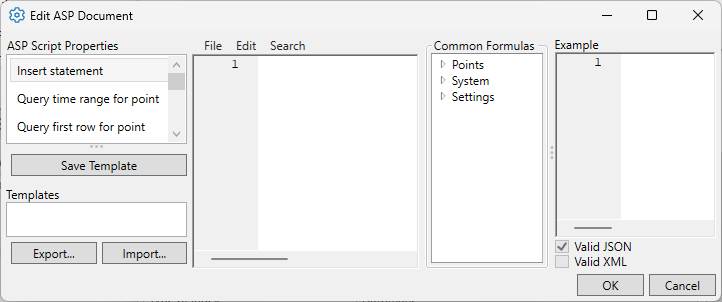
This editor is currently documented in ASP Document Definition for the REST External Historian. Some ODBC-specific information is provided below.
Query Statements
Query statements are used when the button is checked in the Write data to Historians list for this historian. This setting enables the database to act as a data source for other DataHub functions such as OPC UA historical data queries, WebView trend charts, or store-and-forward capabilities in MQTT or tunnel/mirroring.

- Query time range for point
Must return the name, value, quality and timestamp for a specified point within a given start and end time. The result set must include any values whose timestamp exactly matches the start or end time. Special variables
startdate,enddateandpointnameare provided to the query script.- Query first row for point
Must return the name, value, quality and timestamp of the row with the earliest timestamp for the specified point. Special variable
pointname, is provided to the query script.- Query last row for point
Must return the name, value, quality and timestamp of the row with the latest timestamp for the specified point. Special variable
pointname, is provided to the query script.- Query unique point names
Must return the unique set of names of all data points for which at least one value appears in the table.
- Query # of values in a time range
Returns a single value containing the number of rows matching a specified point name within a given time range, inclusive of the start and end time. Special variables
startdate,enddateandpointnameare provided to the query script.- Query point value at timestamp
Returns the name, value, quality and timestamp from the row whose timestamp is less than or equal to the specified time, for the specified point name. Special variables
startdateandpointnameare provided to the query script.- Query point value after timestamp
Returns the name, value, quality and timestamp from the row whose timestamp is greater than the specified time, for the specified point name. Special variables
startdateandpointnameare provided to the query script.- Query point values in index order
The query used by store-and-forward. If you are not using this database as a source for store-and-forward, you do not need to provide this query. If you provide this, it must produce all rows in the table whose index value is greater than or equal to the value of the variable
start, in index order, up to a maximum row count oflimit. Special variablesstartandlimitare provided to the query script. This script does not depend on a particular point name. It returns rows in index order across all point names.
Modify Point Names, Data Sampling and Forwarding
Please see Modify Point Names, Data Sampling or Forwarding in Connection Configuration for how to configure these options.
Once you have completed the ODBC-specific configuration, you can return to Picking Points in General Options to continue.