8.5.4. Bridging to Excel
The DataHub program makes it easy bridge data from an Excel spreadsheet to an OPC server.

Simply connect a DataHub instances to Excel, then configure the bridges. To get Excel data into an OPC server without changing any names in Excel or any OPC point names, follow these steps:
Define a DDE Item in the DataHub instance for the Excel point. For example, the cell
A1in a spreadsheet would become DDE Itemr1c1(Row 1, Column 1).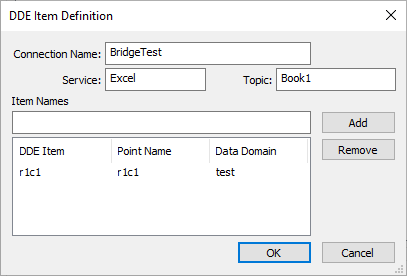
Configure a point-to-point bridge using the Excel point as the source and the OPC point as the destination. If we used our OPC server
Aand the point nameswitchfrom the example above, the bridge would look like this:
This bridge would allow you to turn the switch on and off (and thus control the motor) from an Excel spreadsheet.