Chapter 1. Introduction
These three APIs share, as much as possible, common methods and syntax. For this reason they are distributed in one package and documented in a single book.
The DataHub API for C++ lets you write programs in C++ that connect to a DataHub instance over TCP, namely LAN, WAN, or the Internet.
The DataHub API for Java lets you write programs in Java that connect to a DataHub instance over TCP, namely LAN, WAN, or the Internet.
The DataHub API for .NET lets you write programs in .NET that connect to a DataHub instance over TCP, namely LAN, WAN, or the Internet. This API is implemented in C#, but can be used with any .NET language.
1.1. Preliminaries
The DataHub APIs for C++, Java, and .NET are made up of two classes,
DataHubConnector and
DataHubPoint whose methods allow you to
interface with the DataHub program.
System Requirements
The DataHub APIs for C++, Java, and .NET are compatible with:
Windows XP Home & Professional
Windows 2000
Windows NT 4.0 - All Service Packs should be installed.
Installation
To install the DataHub APIs for C++, Java, and .NET from an archive downloaded from the Cogent web site, follow these steps:
Double-click on the program archive
DataHubAPI-7.3-.xxxxxx-Windows.exeFollow the instructions.
DataHub Configuration
The DataHub instance must be configured to act as a Tunnel/Mirror Master as follows:
Right click on the DataHub system-tray icon and choose .
In the Properties window, select Tunnel/Mirror

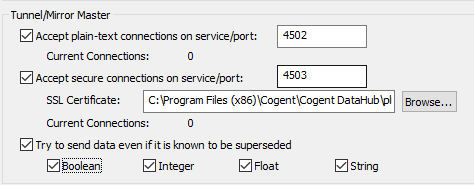
In the Tunnelling Master section, you can configure plain-text or secure tunnelling. Ensure that at least one of these is checked. If you want to change any of the other defaults, please refer to Tunnel/Mirror in the Cogent DataHub manual for more information.
![[Note]](images/note_1156523861.png)
To optimize throughput, un-check the Try to send data even if it is known to be superseded option. This will allow the DataHub instance to drop stale values for points which have already changed before the client has been notified of the original change. The latest value will always be transmitted.
Click to close the Properties window.