Chapter 2. What's Different About DataHub Scripting?
2.1. Scripts and their Environment
The DataHub scripting environment is different from most other programming paradigms because its primary purpose is to allow users to interact with the highly dynamic real-time process data that flows through a DataHub instance. Although syntactically similar to C, DataHub scripts offer unique capabilities, due in part to these features:
2.1.1. Dynamic Environment
DataHub scripts run in a dynamic environment. The DataHub scripting engine, called Gamma, starts when a DataHub instance starts, and runs continuously until the DataHub instance shuts down. You can think of Gamma as a kind of processing power grid that's always switched on and running in the background. All of the data in the DataHub instance is available in this grid. DataHub users can tap into the power of the grid through scripts.
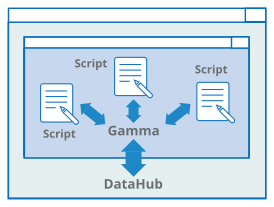
Scripts are like tools plugged into the grid. All of the live data in the DataHub instance is available to each script. A user script can be started manually or automatically, and typically runs until the DataHub instance shuts down. Scripts can range in complexity from the simple Hello World example in this manual to the entire Data Logging interface of the DataHub program itself.
In addition to scripting, you can access the Gamma engine interactively, from a command line in the Script Log.
2.1.2. Event Driven
DataHub scripts are event-driven, meaning that they respond to events as they occur. In our power grid analogy above, when you start a script, it's like switching on a tool that's plugged into the grid. The tool sits in standby mode, ready to respond when needed. It has a been programmed to respond in a particular way to certain events.
This behavior is difficult to achieve using a typical linear program that gets executed instruction by instruction. For example, a DataHub script has no mainline. Instead, a DataHub script contains two major elements:
Event handlers contain the code to be run when a DataHub point changes value.
The
.OnChangemethod specifies the event (usually a data change) for which an event handler should be invoked. This change may be caused by an alarm condition or a timer firing or any other real-world event represented by a point in the DataHub instance. The.OnChangemethod binds a data change event in the DataHub instance to a specific event handler.Please refer to Partial Evaluation for an example.
When the script is run, the Gamma engine loads all the bound event handlers into memory, and waits. Whenever a bound point in the DataHub instance changes value, the Gamma engine executes the event handler code.
2.1.3. Object Oriented
DataHub user scripts are object oriented. Each user script
creates a class derived from a base class called the Application
class. This approach keeps the variables and methods of the script together in a
tidy package, allowing them to be global in scope within the class, but separate
from any other scripts running in the Gamma engine. To make the scripts easy
to write, the New Script File dialog
from the Scripting option of the
DataHub Properties window creates an instance of the
Application class automatically, complete with
templates for methods. Based on this template, a typical script contains the
following:
A Gamma
requirefunction to load theApplicationclass.A class definition for the script's class. By default this class gets the same name as the script.
Method definitions for event handlers and other functions.
A
constructormethod, containing one or more calls to the.OnChangemethod of theApplicationclass (see explanation above). This is as close to a "mainline" as a DataHub script gets, but in reality there is no linear flow to the program once all the code has been read in.A
destructormethod, specifying any code that needs to be cleaned up when the class is destroyed or the script shuts down.Class instantiation. Once the class has been instantiated, it just sits there and responds to events.
Example
Here is what a new, unedited template for the class
MyApp would look like:
/* All user scripts should derive from the base "Application"
   class */

require ("Application");

/* Get the Gamma library functions and methods for ODBC and/or
 * Windows programming.  Uncomment either or both. */

//require ("WindowsSupport");
//require ("ODBCSupport");

/* Applications share the execution thread and the global name
 * space, so we create a class that contains all of the functions
 * and variables for the application.  This does two things:
 *   1) creates a private name space for the application, and
 *   2) allows you to re-load the application to create either
 *      a new unique instance or multiple instances without
 *      damaging an existing running instance.
 */
class MyApp Application
{
}

/* Use methods to create functions outside the 'main line'. */
method MyApp.samplemethod ()
{
}

/* Write the 'main line' of the program here. */
method MyApp.constructor ()
{
}

/* Any code to be run when the program gets shut down. */
method MyApp.destructor ()
{
}

/* Start the program by instantiating the class.  If your
 * constructor code does not create a persistent reference to
 * the instance (self), then it will be destroyed by the
 * garbage collector soon after creation.  If you do not want
 * this to happen, assign the instance to a global variable, or
 * create a static data member in your class to which you assign
 * 'self' during the construction process.  ApplicationSingleton()
 * does this for you automatically. */
ApplicationSingleton (MyApp);