Chapter 12. Using the Web Server
12.1. Introduction
The DataHub program has a built-in web server that lets you display live data in a web page in several different ways, depending on your needs. The data can come from any data source that is connected to the DataHub instance. A two-way data flow allows the user to view data and also write data back to the DataHub instance.
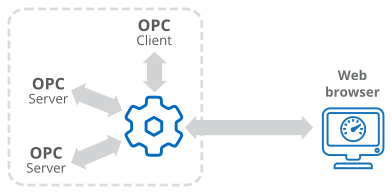
There are several different display technologies available:
ASP (Active Server Pages) DataHub scripts embedded in an HTML page are run by the DataHub instance each time the page is requested by the client. The DataHub scripts generate the page content dynamically before sending the page to the browser. This is also called "server-side scripting".
WebSocket Not yet documented
Here is a comparison chart for these technologies:
| ASP | WebSocket | |
|---|---|---|
| Web browser support | Desktop and mobile | Desktop and mobile |
| Plug-in/Active X required | No | No |
| Update speeds | No updates - Manual refresh required | Fast updates |
| System requirements (CPU and memory) | Low | Low |
| Bandwidth requirements (Will depend on point count and update rate) | Very low | Moderate to low |
| Security (Password / SSL protection) | Yes | Yes |
| Firewall friendly | Yes | Yes |
| Licensing (Licenses required in addition to the standard DataHub Node license) | DataHub Web Server license | DataHub Web Server license, + TCP Link license for each connection |
| Programming Requirements | Uses DataHub scripting language | Uses HTML or JavaScript |
| Types of Application Common uses | Good for displaying static or slow moving data. Used for shift reports and statistics. | Not yet documented. |
These different display technologies can be used together in the same page. For example, you can use ASP to access data from an ODBC database and display it as part of the web page, along with the live data from the DataHub instance.
More about ASP
Most process data does not update very quickly, so ASP is suitable for a wide range of applications.
ASP will typically use very few system resources and bandwidth, so it is good for low speed connections.
ASP is the most efficient method for handling a large number of user connections.
ASP pages are generated by a script running in the DataHub instance. This means you can use the script to bring in data from other sources, such as from SQL databases. The web page can then display data from both live sources and database or text file archives.
Web pages that are generated by ASP scripts can usually be displayed on all desktop and mobile web browsers. This is because while the scripts themselves are written in the Gamma language (the DataHub script language), the web pages they generate are delivered as plain HTML.
In order to see new point values in an ASP page, you need to refresh the web page manually.
More about WebSocket
Not yet documented.
Not yet documented.
Not yet documented.