1.2. Installing Licenses
You can install DataHub licenses purchased from Cogent using the option in the Properties window.

|
The Licenses option lets you view and install Cogent DataHub licenses. When the DataHub program starts up it will run in demo mode (one hour time limit) if no licenses are found. If any license is found on a DataHub instance running on any connected machine, the DataHub instance switches to license mode, and each connected DataHub instance then requires a license. |
Licenses can be entered individually or loaded from a file.
The button opens the Enter License String window:
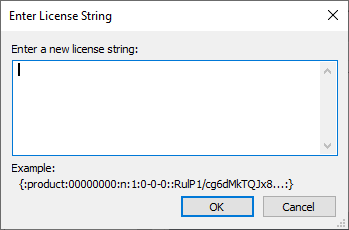
Here you can paste or manually enter the text string for the license provided by Cogent.
For DataHub version 10 and later, select everything including the
{:and:}characters.For DataHub versions 8 and 9, select everything including the first and last
:characters.
![[Note]](images/note_1156523861.png)
Running a DataHub instance on a Microsoft Azure virtual machine requires a special license key. Contact Cogent for details. Normal practice is to use the Skkynet DataHub managed application for Azure.
The license string may contain the characters
l(lower case L) and1(one) which can look nearly identical in some type fonts. If possible, it is best to copy and paste the string, rather than retyping it.The button opens a Windows file selection window. Browse to find the directory and license file that you want to load. License files end with a
.licextension. Once you have found the license file, click the button to load the file. (Please refer to Configuration and License File Locations in Configuration Files for more information on license file locations.)
To remove a license from your system, select one or more licenses in the Details window, then click the button.
Troubleshooting License Installation
The possible causes of a license installation problem are:
Different DataHub version. Each DataHub version (v7, v8, v9, v10, etc.) has a different license.
Running on Azure. The DataHub program requires a special license key when running on a Microsoft Azure virtual machine. Contact Cogent for details. Normal practice is to use the Skkynet DataHub managed application for Azure.
A typographical error. If you are hand-entering the license key, watch out for mistakes between lower case letters
Land1, and between the upper case letterOand the numeral0.A copy/paste error. If you are copying and pasting the key, make sure that you include the correct leading and trailing characters in the key.
For DataHub version 10 and later, include the
{:and:}characters.For DataHub versions 8 and 9, include the first and last
:characters.
If you are having trouble with a copy/paste, try opening Notepad and copying the license keys into it. Once the license keys are in Notepad, replace all of the "-" (minus sign) characters in the license keys by selecting and re-typing the - sign. You might notice that minus signs in the key are actually converted to something else, like a box or an exclamation mark. You need to change them back, then try adding the license code to the DataHub instance again.
Unicode characters. If you copy a space into the entry field, it may be a Unicode space instead of an ASCII space. The entry field will automatically strip ASCII spaces, but it cannot distinguish Unicode spaces. This could happen if you are working with a non-English character set that defines its own space, such as Japanese.
Invalid duplicate key. The DataHub
licenses.licfile may contain an invalid license key with the same license number. To fix:Delete the
licenses.licfile from the DataHub configuration folder (usuallyC:\Users\).username\AppData\Roaming\Cogent DataHubRestart the DataHub instance.
Install the new license key.
If none of these are helpful, please contact [email protected] and send a copy of the licenses.lic
file, along with the version number of the DataHub instance you have installed it on.
Missing features
If the licenses are installed correctly, but you are not seeing all of the licensed features in the Properties window, then it is possible that they were not enabled during the initial install of the DataHub instance. You can check this by re-installing the DataHub software, and ensuring that all of the features you need are checked in the Choose Components step of the installation.
