2.4.4. Simple Binding - Copy and Paste
Another way to create a simple binding is by copying a reference for a binding and then pasting the link. This is especially useful if you know what properties you need to bind, or if you need to link many controls to a single reference control. Below is an example, based on the controls created in the example above. In this example, the hexagon again is the reference control, and the rectangle is the linked control.
Select the hexagon (reference control), and in the Line Properties, change the Stroke Thickness to 5. You should see the border of the hexagon become 5 pixels thick.

Right-click on the Stroke Thickness label, and from the drop-down menu, select .

Select the rectangle (linked control), and in the Basic Properties, right click the Stroke Thickness label, and from the drop-down menu, select ,
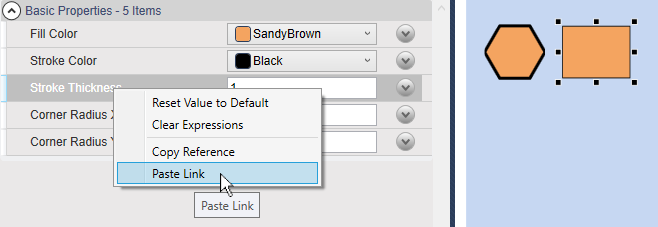
The border of the rectangle will change to 5 pixels. It is now bound to the width of the hexagon's border, and will change whenever that gets changed.
