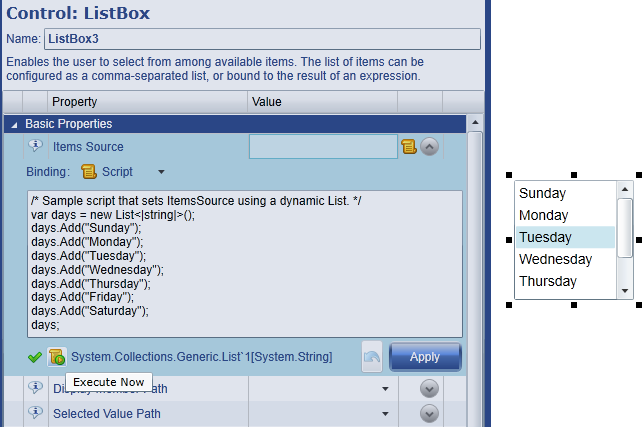
The editor features automatic syntax checking and an 'Execute Now' button that triggers the script immediately so the result can be previewed.
Script Editor used to create Script Binding
In this example, a list of strings representing the days of the week is created. The script is associated with the listbox Items Source property via a Script binding. When the user clicks the 'Apply' button, the result is assigned to the Items Source property. Alternatively, clicking 'Execute Now' triggers the script immediately. This is most often used when the script belongs to an event handler and needs to be tested (without waiting for the event to occur).
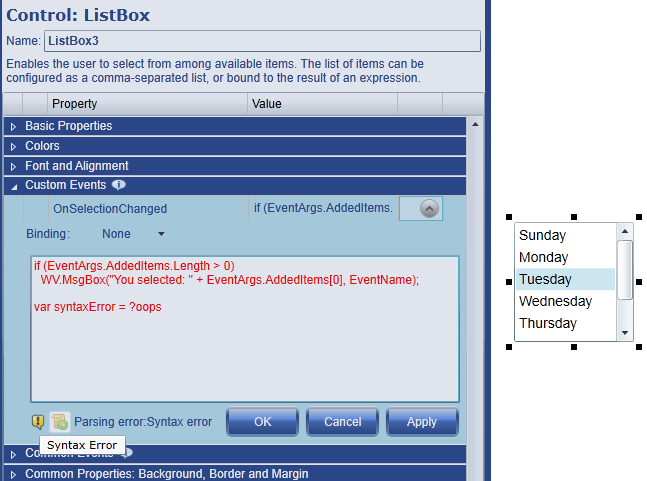
Script Editor used to create Event Handler
In this example, the script is associated with the listbox OnSelectionChanged event. The script is triggered whenever an item in the listbox is selected. For illustration, the script contains a syntax error (highlighted with red text and a warning icon).