Chapter 1. Overview
The Cogent DataHub service is available as a Microsoft Azure Managed Application, which allows you to make secure connections between machines, applications and embedded systems that utilize real-time data. Based on industry-leading technology, the Cogent DataHub service can help you:
Aggregate data from multiple sources into a common data set for analysis and storage.
Make data from your plants available to remote users.
Feed data from multiple locations into other Azure Managed Applications.
The connection between the data in your plant and your Microsoft Azure VM is established using DataHub technology on both sides. At the plant you install the Cogent DataHub program (or use an ETK-enabled device), to send data to a DataHub instance in the cloud, running as a provisioned Azure Managed Application. You can also connect other programs to the DataHub instance running on Azure, such as databases, historians, and Microsoft Excel.
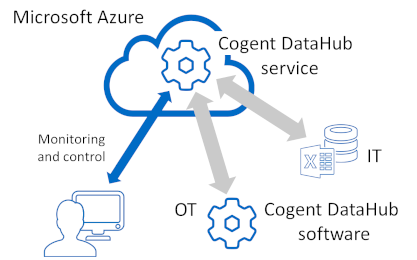
Connections between DataHub software and services use the DHTP (DataHub Transport Protocol), a secure network protocol designed to optimize and protect data transmitted over public and private networks. DHTP lets you make outbound connections through firewalls, keeping all inbound firewall ports closed on your plant. It supports SSL, connections through DMZs, and network proxies to ensure secure OT/IT connections.
The Cogent DataHub service offers these optional features, which you can activate as needed:
AVEVA Historian – Read and write data to AVEVA Historian and Insight.
InfluxDB – Read and write data to InfluxDB. Required for store-and-forward.
Amazon Kinesis – Write data to Amazon Kinesis with optional store-and-forward.
MQTT Broker - MQTT Smart Broker with robust MQTT protocol conversion.
MQTT Client - Connect to MQTT brokers with advanced parsing, protocol conversion and optional store-and-forward.
OPC UA - Connect and aggregate OPC UA clients and servers.
OPC AC – Aggregate and serve OPC UA A&C Alarms and Conditions.
Notifications - Generate alarms, email, SMS and actions based on data changes.
Bridging – Zero-latency server-to-server bridging.
OSIsoft PI System Historian – Read and write data to OSIsoft PI System.
Redundancy - Resolve identical incoming data streams to a single output.
REST Historian – Read and write data to the REST Historian.
WebView – Visualize data with full featured multi-user SCADA HMI.
In addition to these, you can also connect Microsoft Excel worksheets, using the DataHub Add-in for Excel.
When you register for the Cogent DataHub service, you are billed monthly through your Microsoft account for services used in the previous month. You will also have access to the SkkyHub portal which allows you to monitor your usage.

This manual contains the information you need to get started with the Cogent DataHub service. Please feel free to contact Skkynet for additional assistance as needed.