8.5. Warm Standby
It is possible to use the DataHub Redundancy feature to support warm standby, by using a DataHub script. Since we perform redundancy at the data level instead of the connection level, the DataHub instance does not naturally know which connections to start and stop when it switches input domains. Consequently you need a script that will watch the redundancy state and turn on or off the connections based on separate knowledge about how the connections match up with the data domains.
Below is an example script that shows how to set up warm standby redundancy. It
requires you to first configure redundancy through the interface, and then re-enter
some of the same information again. For example, here is an OPC configuration,
showing two connections named OPC000 and
OPC002 feeding data into domains input1
and input2:
Configure the OPC servers.

Configure a redundancy pair labeled, for example,
RED001.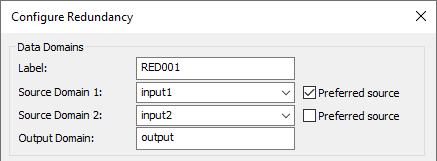
This redundancy pair must include configuration for the four status points. You can name them whatever you like:

The script needs to be edited so that it contains the configured information about the redundancy pair, including the Label, Source Domain 1, Source Domain 2, Output Domain name as well as all four Status and Control Data Point names.

The rest of the information in the
Attachcall will be ignored. Once we have attached to the redundancy pair, we can tell the script which OPC connections correspond to the input domains. These are provided as the OPC connection label corresponding to each input domain.
When you run the script, it will watch the status points and determine which OPC connection should be active and which should be inactive based on the status of the data.
Example Script
WarmStandby.g
require ("Application");
require ("DomainBridgeSupport");
require ("Quality");

class WarmStandby Application
{
}

method WarmStandby.constructor ()
{
    local redconf = new DomainBridge();
    redconf.SetApplication(self);
    redconf.Attach("RED001", "input1", "input2", "output",
		   0, 0, nil, 0, nil,
        "CurrentSource", "State1", "State2", "Preference");
    redconf.OPCWarmStandby("OPC000", "OPC002");
}

ApplicationSingleton (WarmStandby);